
Conversion Funnel: Inquiry to Paid
After reading this, you'll know how to read the Conversion Funnel and identify where jobs are being lost in your pipeline.
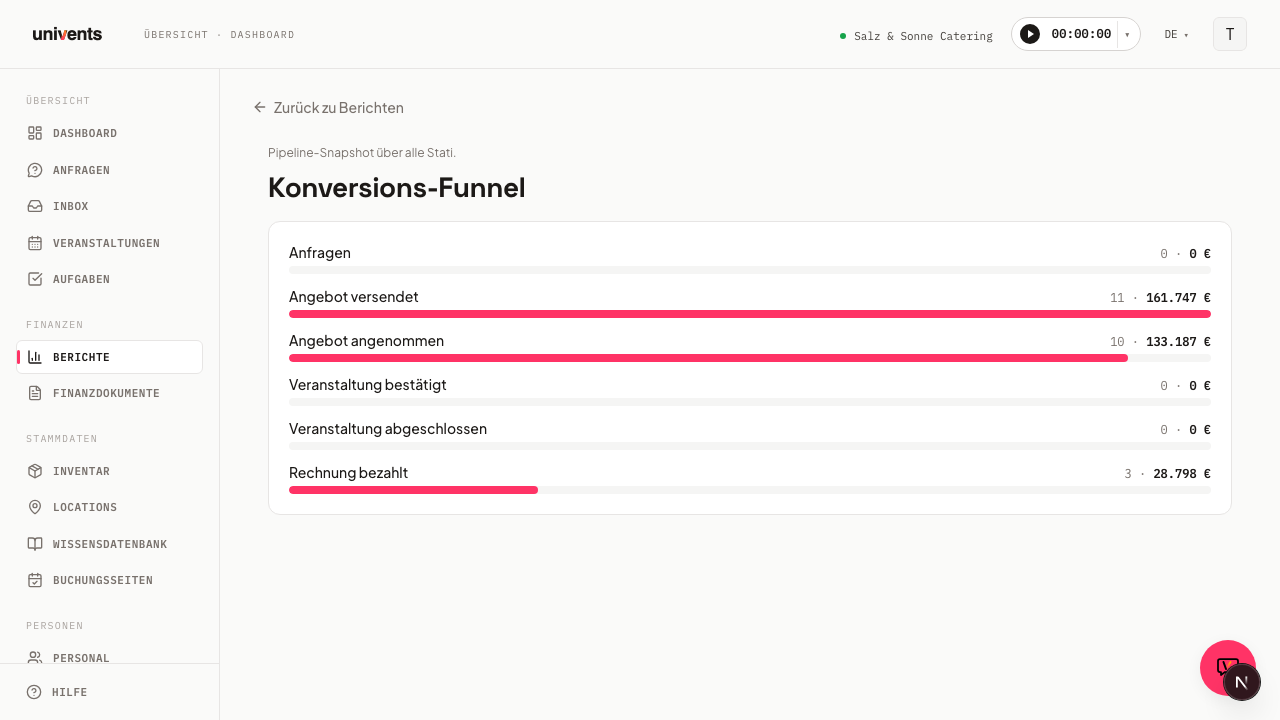
The Conversion Funnel gives you an at-a-glance view of how many records are currently at each stage of your sales pipeline — from the first inquiry through to a paid invoice. For each stage you see the number of records and the associated volume in euros.
How to open the Funnel report
- Click Reports in the left-hand navigation.
- Select the Konversions-Funnel card from the overview.
- The page automatically loads the current state of your pipeline — there are no additional filters to set.
At the top left you'll find the Back to Reports link, which takes you back to the reports overview at any time.
The six funnel stages
The report displays six stages in sequence. Each row shows the stage name, the number of records, and the gross volume in euros. A horizontal bar makes the relative share of each stage visible at a glance.
| Stage | What it shows |
|---|---|
| Inquiries | Events with the status "Inquiry" — no quote created yet |
| Quote sent | Quotes that have already been sent to the customer (including those already accepted) |
| Quote accepted | Quotes the customer has explicitly accepted |
| Event confirmed | Events with the status "Confirmed" |
| Event completed | Events with the status "Completed" |
| Invoice paid | Invoices with the status "Paid" |
The bars always show the proportion relative to the longest stage — the stage with the most records gets the full bar, and all others are scaled proportionally.
Reading the numbers correctly
Each stage shows two values side by side: the number of records and the gross volume in euros. Both values reflect the current point in time — the funnel is a snapshot, not a historical trend.
This means: an event that moves from "Inquiry" to "Confirmed" today disappears from the Inquiries stage and appears under Event confirmed. The funnel therefore always shows the live state of your pipeline.
The euro volume for the quote stages is based on the gross total value of the respective quotes. For the event stages, the gross total value of the event is used. For invoices, the gross invoice amount is included.
What the funnel tells you — and what it doesn't
The funnel is well suited for identifying where records are getting stuck in your pipeline. If there's a high value at Quote sent but little at Quote accepted, it's worth taking a closer look at open quotes and following up with customers directly.
What the funnel doesn't show: it doesn't cover a time period and has no filtering by date range or category. For revenue trends over time, use the Revenue per Month or Revenue by Period reports.
Frequently asked questions
The funnel is empty — what's wrong? The report shows the message "No pipeline data available yet" when no inquiries, quotes, or invoices have been created in the account. Create your first inquiry and the funnel will populate automatically.
Why is the "Quote sent" stage higher than "Quote accepted"? This is normal and expected: "Quote sent" includes all sent quotes — including those that were subsequently accepted. "Quote accepted" counts only the subset where the customer has explicitly confirmed.
Can I filter the funnel by date range? No, the Conversion Funnel shows the current pipeline state without a date filter. For time-based analyses, use the other reports under Reports.