
Event Margins: Margin per Event
After reading this article, you will be able to review revenue, costs, and margin for every event in a given period at a glance and identify which events were most profitable.
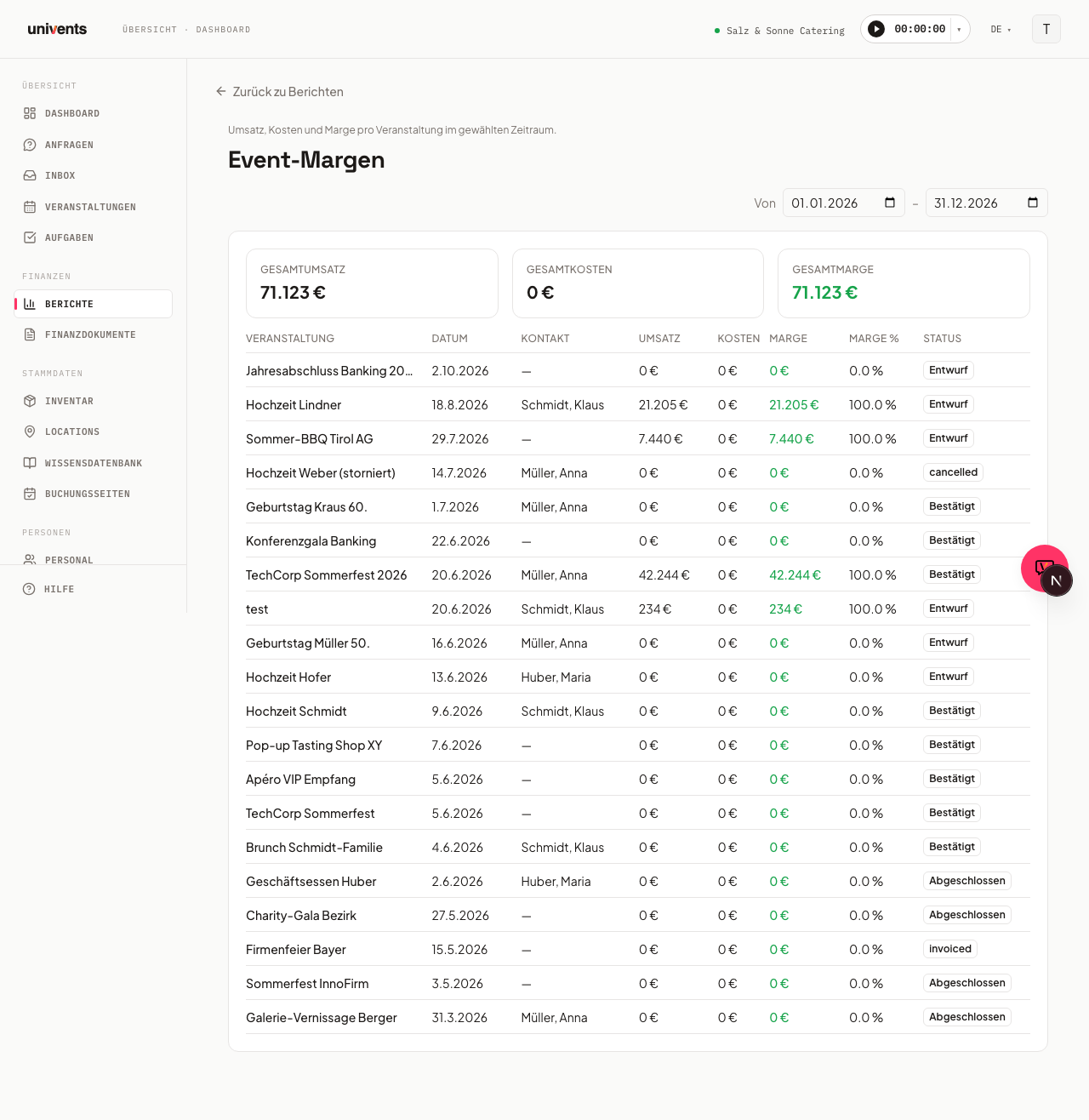
The Reports section shows you, for each event in the selected period, the net revenue, net costs, and the resulting margin — including a totals row across all events.
Opening the report
- Navigate to Reports in the left-hand menu.
- Click the Event Margins tile.
- The report opens with the current calendar year pre-selected.
Adjusting the date range
In the top right you will find the date filter with the From and To fields. Select a start and end date to narrow the evaluation period — the report reloads immediately whenever you change a date. The dates are preserved in the URL, so you can bookmark a specific period or share it directly.
Summary cards
Directly above the table, Univents shows three cards:
- Total Revenue — sum of all net revenues in the period
- Total Costs — sum of all net costs in the period
- Total Margin — revenue minus costs; positive values shown in green, negative in red
The cards give you an instant financial overview before you drill into individual events.
Reading the table
Each row represents one event. The columns are:
| Column | Content |
|---|---|
| Event | Name of the event |
| Date | Start date of the event |
| Contact | Linked customer or contact person |
| Revenue | Net revenue from invoices linked to the event |
| Costs | Net costs linked to the event |
| Margin | Revenue minus costs (green = positive, red = negative) |
| Margin % | Margin as a percentage of revenue |
| Status | Current event status, e.g. Confirmed, Completed, Draft |
All amounts are in euros (net, excluding VAT).
Returning to the reports overview
Use the Back to Reports link in the top left to return to the overview of all available reports at any time.
Frequently asked questions
Why are some events missing from the list? The report filters by the start date of the event. Events whose start date falls outside the selected period will not appear — even if related invoices were created within the period. Adjust the date range accordingly.
Why does an event show a margin of 0? If no financial documents (invoices or costs) have been created for the event yet, both revenue and costs are shown as 0. Check whether the documents are assigned to the correct event.
Can I export the report? A direct table export is not currently built in. You can print the page in your browser or save it as a PDF to share the report.