

Kitchen and staff in one system
One booked event creates the production list and the shift plan at the same time. Quantities, shifts, tracked hours and labour cost all follow the same guest count instead of living in a scheduling app, an inventory tool and a spreadsheet.
7-day free trial · no credit card · live in minutes
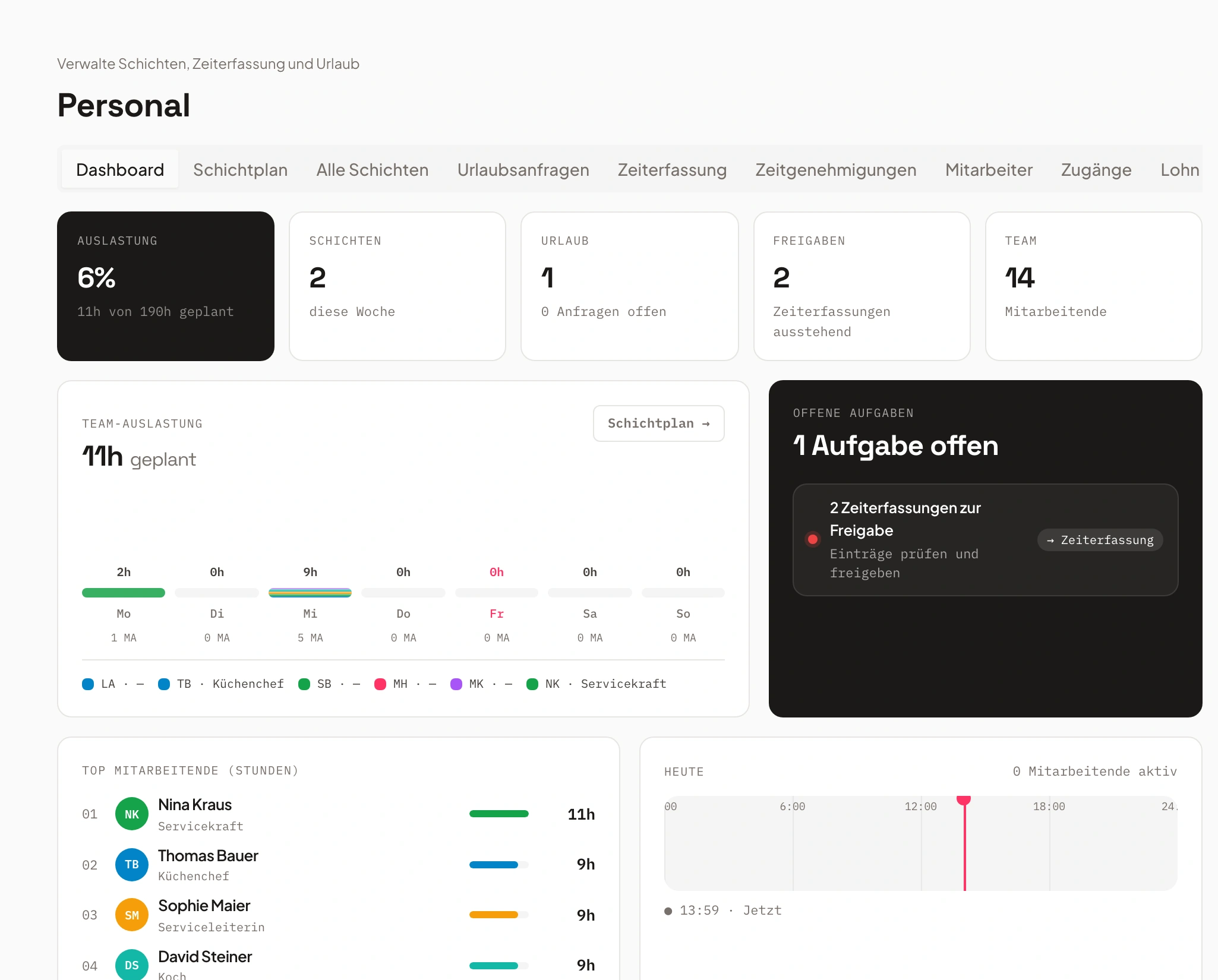
- Service Saturday3 open
- Kitchen Fridayfilled
From booking to payroll
Three steps, one data base: what the event says drives both kitchen and staff.
Book the event
Guest count, menu and date are entered once, on the event. Univents derives the production quantities and the staffing demand per job from them.
One entry instead of three tools.
Kitchen and shifts appear
The production list goes to the kitchen monitor, the staffing demand into the shift plan. Both sides work from the same numbers, even when the guest count still changes.
Kitchen and staff stay in sync.
Track hours, see cost
The team clocks in and out in the staff portal. Approved hours feed the payroll export and show the labour cost of that event at the same time.
Labour cost sits on the event itself.
Bookings: calculating quantities per guest and hour automatically
The Bookings tab is the one list everything else grows out of: the document, the kitchen sheet, the production list, the packing list. You see how a line item is booked from the catalog, how quantities calculate automatically — per guest, per hour or as a flat amount — and what the status pills on each row mean.
Chapters
Show transcript
Our quote is confirmed, we are planning the event, and now let us look at how we put together our production lists, packing lists, storage lists and order lists within the event. That is what the Bookings tab is for: it holds every booking for the event — the products needed for it, both the ones from the quotes and line items we add independently of them, for things that are only relevant internally and should not appear on the quote. In the overview, you can create a finance document — quote, invoice or delivery note — directly from the Bookings tab, add line items from your line-item templates, and generate your production lists from the filtered line items. You also get an overview of your various suppliers here: which suppliers you have for which products, and you can trigger the corresponding orders to them or edit order details — for example how delivery and pickup work, who on the team is responsible, and what the delivery address looks like. You set up all of this information here for your partners. Once you trigger the order, they get their own portal where they can see it, let you know whether it works out or changes are needed, upload a quote, and also view event information such as the run of show or the general event details. Below that, there are two tabs. One is Line items, where our items are listed just as they are on the quote — this top-level view matches the quote directly. You can expand it: here, for example, is our Italian three-course menu, which includes bruschetta as a starter, and inside the bruschetta we see the full list of ingredients it needs. That lets us generate the matching packing lists, for example for our storage or for the kitchen. Click it, and this is what comes out: a generated list as a PDF with all the line items in it. We also have the option to display the material view, where all the line items are listed individually and you can see exactly what status each one has — whether the customer has confirmed it or it is already invoiced. You can also add notes to individual line items and display them both as raw quantities and packed — if we have packaging quantities stored, it converts directly into the corresponding packaging units. We also have our packing lists, which we can share fully with our team so they show up in their view, and the team can check off the packing lists item by item as they gather everything. If you want to create specific lists, you can sort your packing lists by category — for example show only the items from the Catering category, or filter by a particular storage location, supplier or tag, and generate separate lists from that. On top of that, you can save internal notes that go onto the lists, or notes on individual line items, which then show up in the kitchen monitor as well as on our production lists and in the function sheet.
One booking, two plans
Production demand and staffing demand come from the same number.
As soon as an event is confirmed, Univents derives both: the quantities for kitchen and purchasing, and the staffing demand per job, from set-up through kitchen and service to tear-down. If the guest count changes, both sides follow.
That removes the usual break between scheduling app and inventory software, where every change has to be entered twice and one of the two lists eventually goes stale.
- Quantities and staffing from one guest count
- Changes apply to both sides
- No copying between two systems
 AI generated
- 1Updated with one click
- 2Quantities and production list recalculated
- 3Kitchen display shows new state
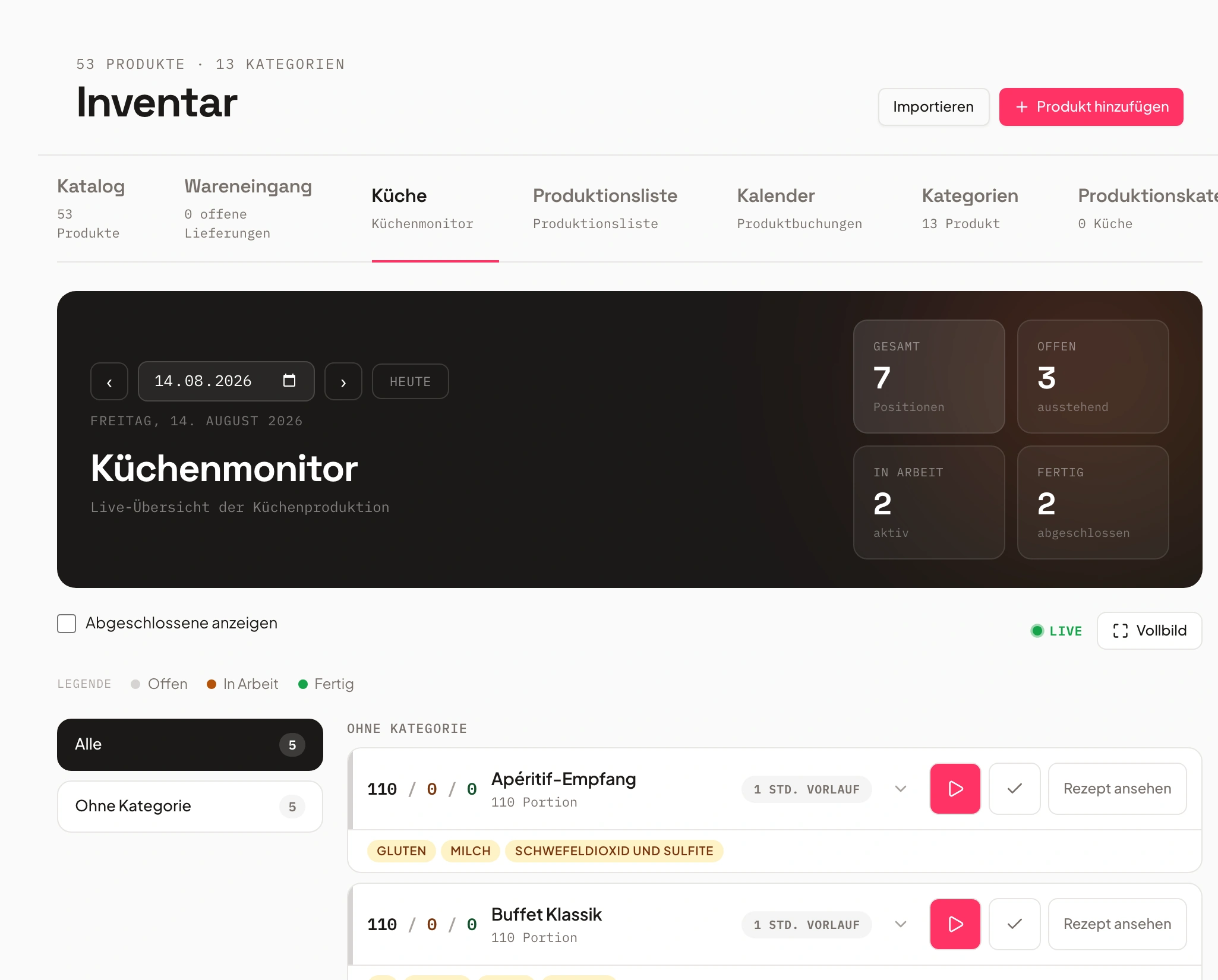
The kitchen sees what is due today
Production list and kitchen monitor come straight from the booking.
Every production item appears on the kitchen monitor with quantity, lead time and allergens. The team moves it from open through in progress to done, visible to everyone on site.
For purchasing and prep, the same basis prints as a production list per event or aggregated across several days.
- Items with quantity, lead time and allergens
- Status open, in progress, done for everyone
- Printable production list per day or event
Shift plans that match the event
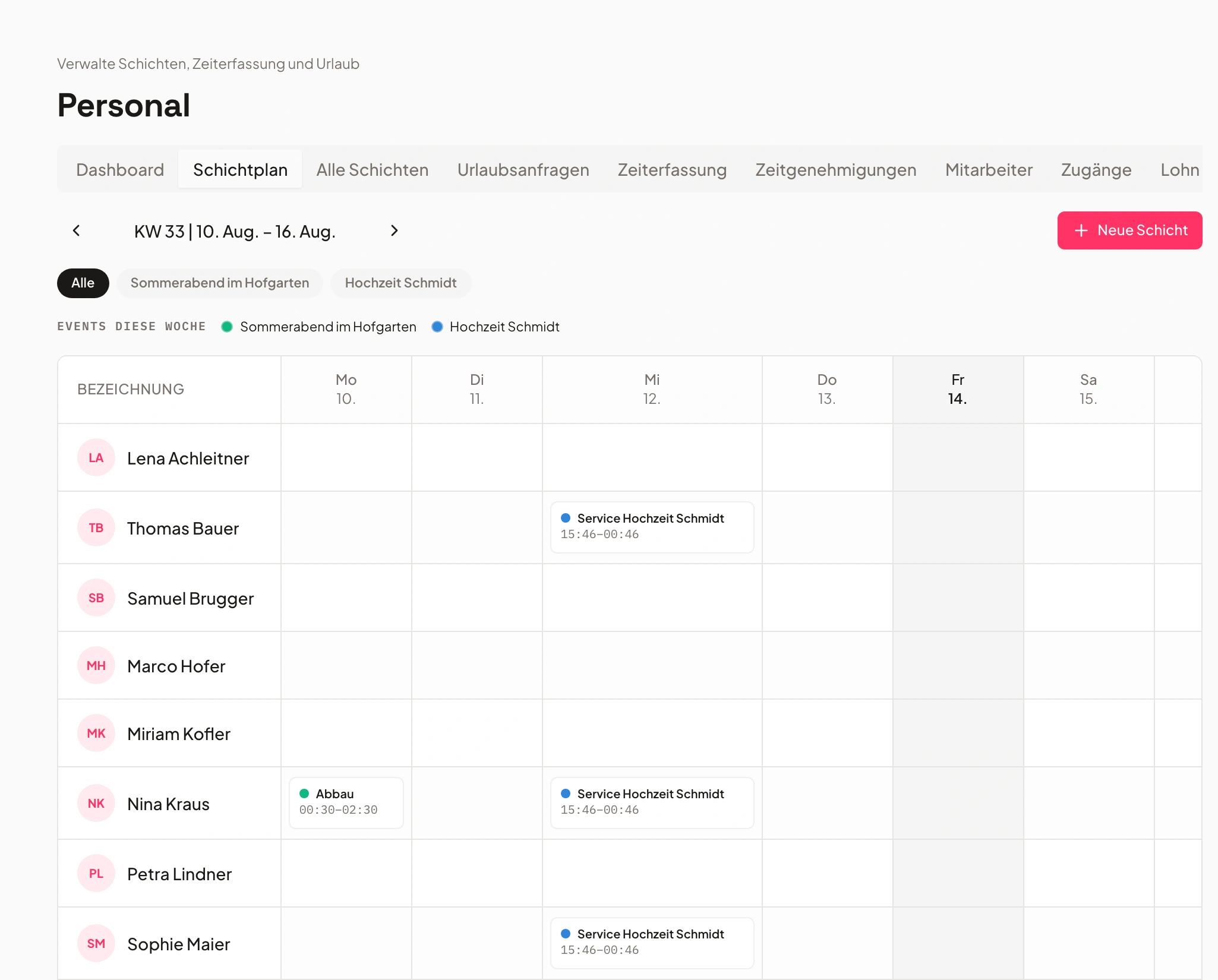
Shifts belong to the event, not to a separate weekly roster.
Shifts are planned per job, with times, meeting point and required qualification. The team sees its assignments in the staff portal, reports availability and requests time off right there.
Temporary staff and freelancers do not need a company account for this: they reach their shifts through a personal link, including push notifications when something changes.
- Shifts per job with times and qualification
- Availability and time off in the portal
- Temporary staff without a company account
From the time clock to payroll
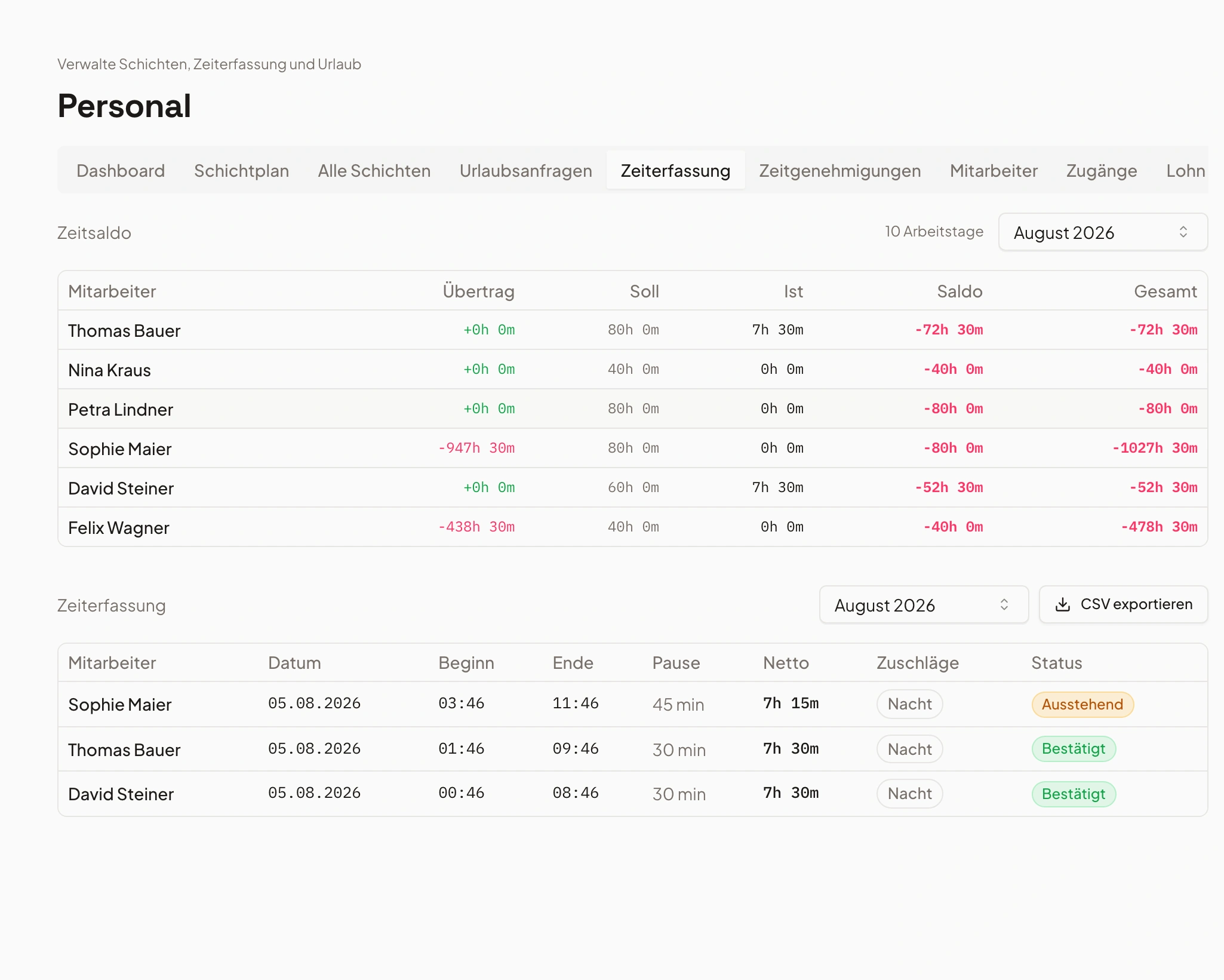
Tracked hours get approved, exported and turned into cost.
The team records working hours in the portal, management approves them. From there come the payroll export for your accountant and the labour cost per event, with no spreadsheet in between.
So next to the revenue of an event you also see the staffing effort, based on the hours actually worked rather than the ones originally planned.
- Time tracking with management approval
- Payroll export for your accountant
- Labour cost per event from actual hours
Frequently asked questions
Which software is suitable for centralising kitchen operations and staff scheduling?
Most operations combine two systems: a scheduling app for staff and inventory software for the kitchen. Univents covers both in one product because both sides come from the same event. Guest count and menu produce the production quantities, the jobs produce the staffing demand. When the booking changes, kitchen and shift plan change together.
Is a pure scheduling tool not enough for a catering business?
For rostering itself, it is. What it lacks is the link to the event: a scheduling tool does not know how many portions are produced, which items are on the quote and what gets invoiced in the end. That is exactly where double maintenance starts. In Univents, shift, production item and document all hang on the same event.
How do quantities from the booking reach the kitchen?
The production list is derived from the booked items and the guest count. It can be viewed and printed per event or aggregated across several days, and it appears as items with a status on the kitchen monitor. If the guest count is corrected, quantities are recalculated.
Can temporary staff and freelancers take part without a company account?
Yes. Besides the regular login there is a personal link through which temporary staff reach their shifts, hours, documents and messages without creating an account. On a phone the portal can be installed like an app and sends push notifications when a shift changes.
How does time tracking work, and what happens to the hours?
Staff clock in and out in the portal or add hours later. Management approves the entries. Approved hours feed the payroll export for your accountant and the labour cost of the event. If hours are billable to a client, they can be adopted as line items on a document.
Can time off requests and availability be handled here as well?
Yes. Staff report availability and request time off in the portal, management approves or declines. Both feed into shift planning, so nobody is scheduled for a day they are not available.
Can I see what staffing cost me for a given event?
Yes. Labour cost per event comes from the tracked hours and the stored rates and sits in the event's finance area next to revenue and cost of goods. Because the figure is based on actual hours, it does not drift from reality when a shift ran longer than planned.
What size of operation is this built for?
For caterers, event venues and event catering from a one-person operation up to around 200 staff. What matters is less the size than the setup: as soon as the same event involves both production and staffing, a shared data base saves more time than two specialised tools.
Ready to get started?
Try Univents for free and see how simple event management can be.
Univents newsletter
Product news and practical tips for event and catering businesses. Roughly once a month, no more.