

The kitchen monitor that keeps up with your events
Every open item live on screen — from the first prep step to plating. Univents pulls quantities and production lists straight from the booking, so nobody enters anything twice.
7-day free trial · no credit card · live in minutes
- Starter platter24 srv.Open
- Beef tenderloin18 srv.In progress
From booking to kitchen monitor
One path from booking to the kitchen screen — no detour.
Book the event
As soon as an event is booked, Univents carries products, quantities and guest count straight into production planning.
No second entry in Excel or on paper.
See every item
The kitchen display shows every open item with quantity, status and notes — on any tablet or screen in the kitchen.
Everyone on the team sees the same state, in real time.
Set status & done
One tap moves an item from open to in progress to done — visible to the whole kitchen and the service team.
Full visibility without shouting across the kitchen.
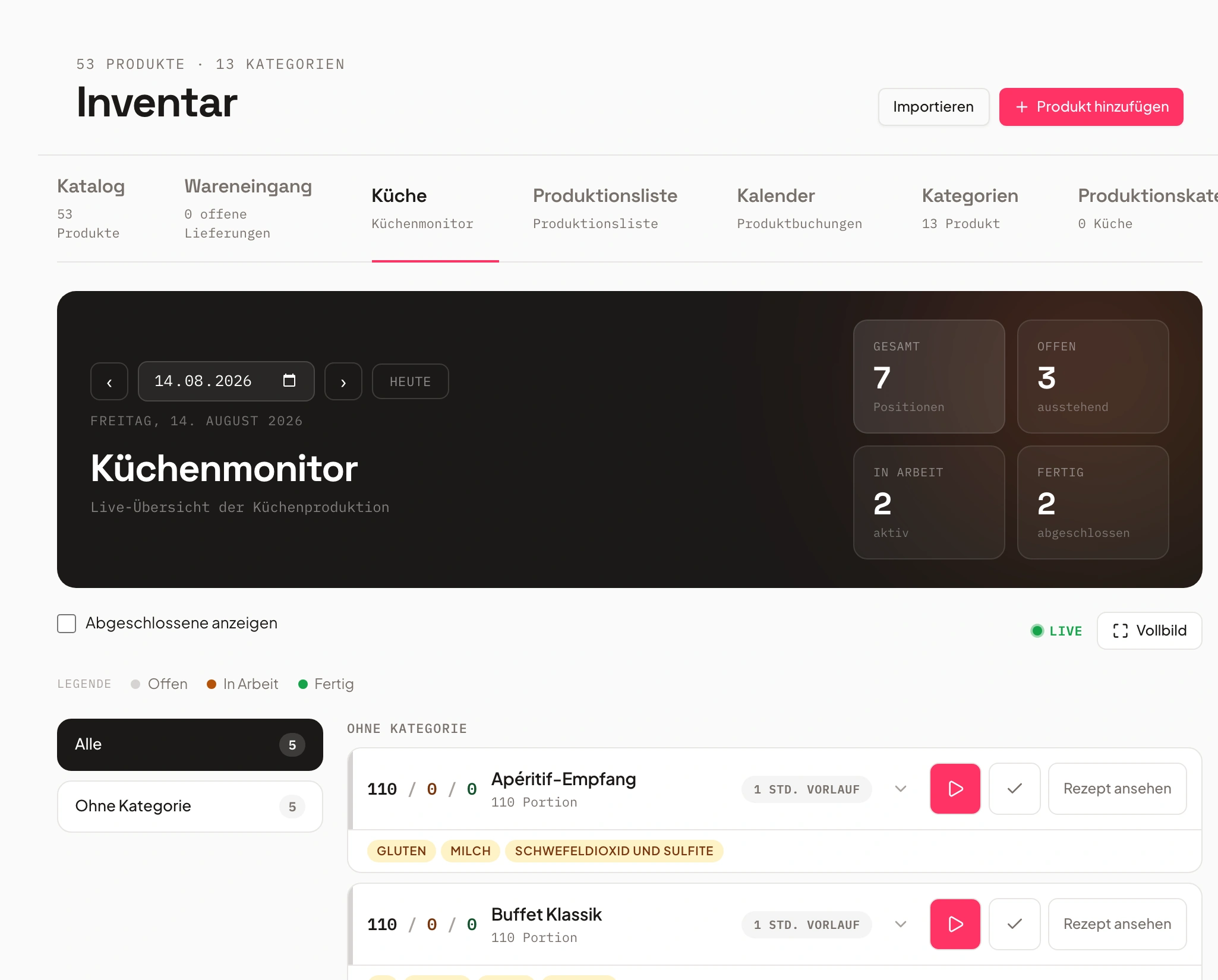
Kitchen monitor, live: open, in progress, done
The kitchen monitor replaces the paper list on the wall. Every item carries three numbers — open, in progress, done — that move forward with a tap and update instantly on every device that has it open. Plus the recipe with the scaled quantity and the kitchen stations in the sidebar.
Chapters
Show transcript
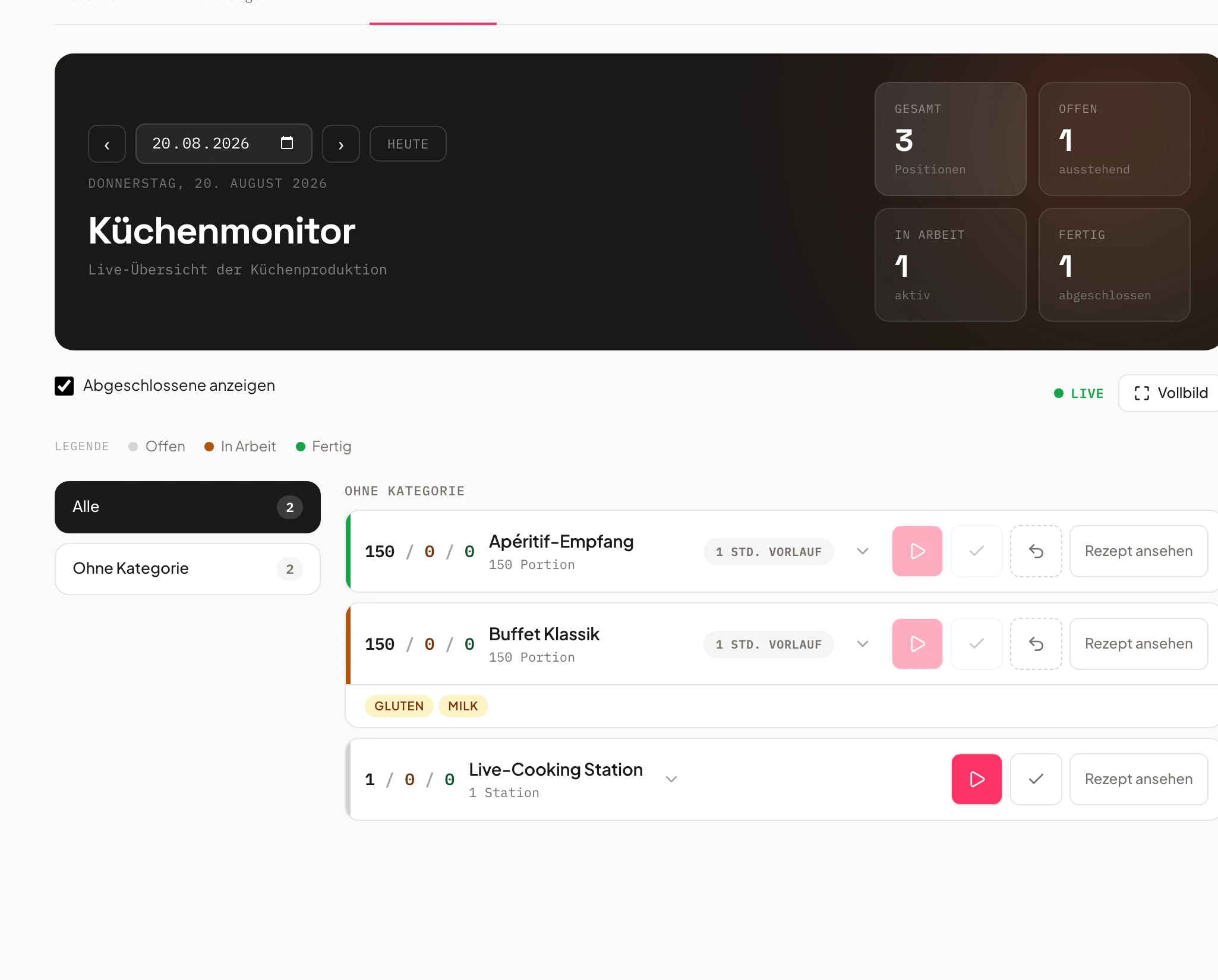
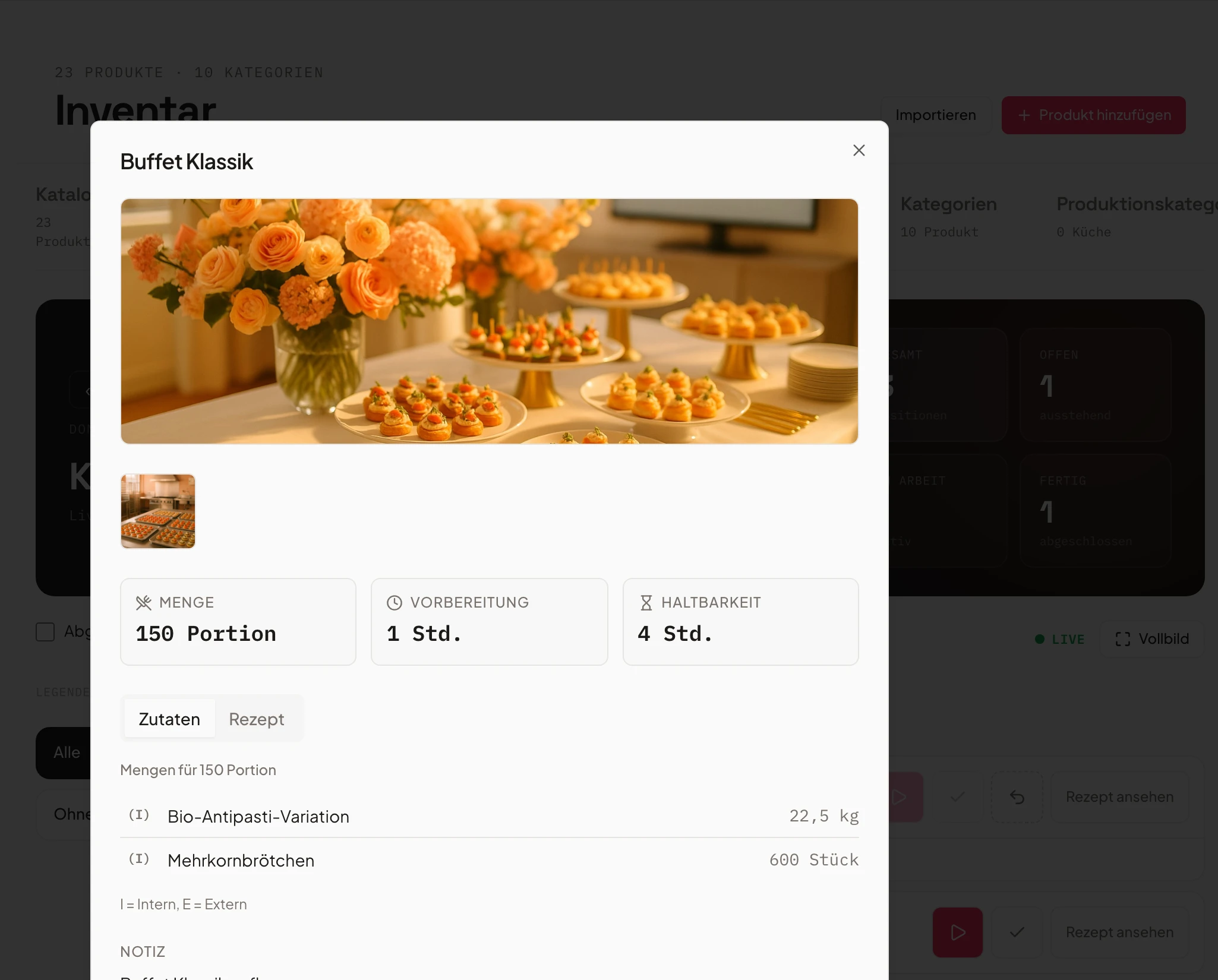
The kitchen monitor is also part of our inventory area. Here you see everything that’s actually relevant for production today. For today we can see the Buffet Classic on the list, which falls under the warm kitchen category. If I open the detail view, I can look at the recipe again. It has all the information in it – the allergens and, where available, the individual recipe steps with pictures. Here we can see exactly which event this belongs to, and we also have the option to start production for each item, per event. So I can just click Start, and the item gets marked as in production. You can see the 170 has now jumped to in production. If more came in for this item in the meantime, this section would fill up again and we could start it over – and we also have the option to mark the whole thing as done once it’s finished. Once it’s actually finished, the status for the corresponding production lists gets updated too. Here we can also see everything that’s already completed. You can see our Soup in a Glass is fully done, along with the Buffet Classic for today. Or we can show production for the coming days right here, in case anything is still open there. We can also display the whole thing in full screen. And we have the option to set who’s allowed to see the kitchen monitor. That means the people working with us also get the kitchen monitor in their staff portal.
Every item with real-time status
Open, in progress, done — visible to everyone, no shouting across the kitchen.
The kitchen monitor shows every production item with its current status. One tap moves it on. Confirmed events appear on their own.
So the whole team can see at a glance what's already done and what's next — no matter how big the event.
- Three statuses: open, in progress, done
- Progress visible live to everyone
- One tap to move an item forward
Quantities and allergens right on the item
Quantities are calculated from the event's guest count at booking.
For every item, the kitchen display shows the current quantity and all relevant allergens — calculated from the booking, not from memory.
When the guest count changes, you update the production list with one click — nobody has to recalculate by hand or write a new list.
- Quantities from guest count, updated with one click
- Allergens and notes visible directly on the item
- No second list, no transcription errors
- Salmon canapés80 srv.Fish
- Vitello tonnato60 srv.Egg
- Vegetable terrine45 srv.Vegan
One change, one click — the kitchen follows
No switching tools — the same software as event planning and quotes.
When a date, quantity or product changes in the event, you update the kitchen display with one click — no re-entry in a separate system.
The kitchen works from the same data as sales and planning — no extra email, no shouting, no spreadsheet reconciliation.
- One click, and the kitchen is current
- One system for planning, quotes and production
- No duplicate entry between teams
 AI generated
- 1Updated with one click
- 2Quantities and production list recalculated
- 3Kitchen display shows new state
The whole day at a glance, anytime
How many items are already done today — at a glance.
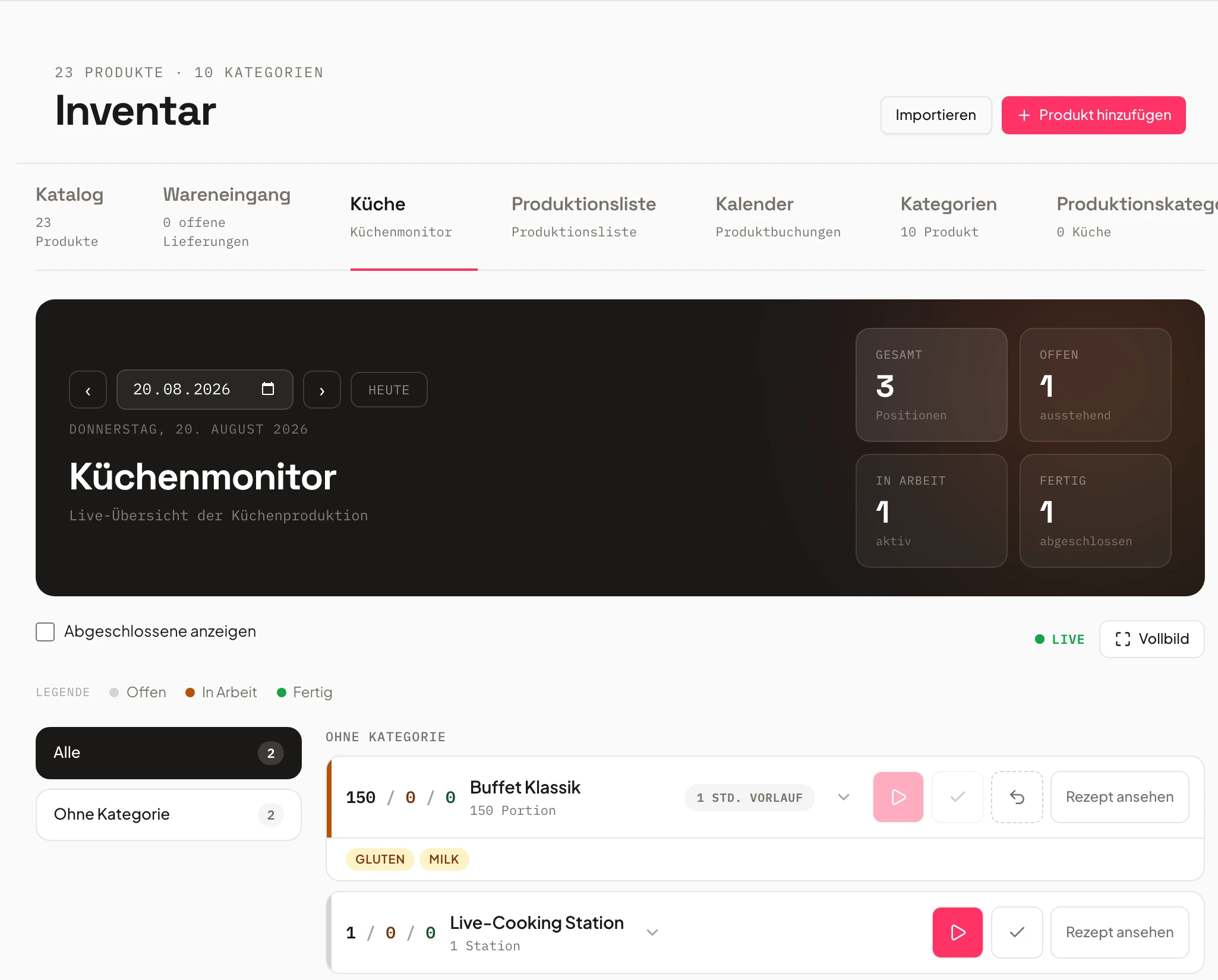
Overview tiles show total, open, in-progress and done items at a glance — plus the status directly on each item, for kitchen management and service alike.
That way the team spots early whether it is on schedule, instead of noticing just before service that something is missing. Kitchen staff also see their kitchen tasks in the Portal.
- Tiles: total, open, in progress, done
- Early warning instead of last-minute stress
- For kitchen management and service alike
Frequently asked questions
Which kitchen display systems show caterers open production items in real time?
Univents' Kitchen Display does exactly that: a live view that shows every open production item with status (open, in progress, done) and quantity. Items are created automatically from booked events — no separate POS integration or manual entry needed.
What's the difference to POS kitchen display systems from à la carte restaurants?
Classic POS-based kitchen display systems are built for continuous order flow in a restaurant. Univents is event-based: quantities come from a booking's guest count, not individual table orders — ideal for caterers and event venues producing for whole events rather than single guests.
Do I need special hardware for the kitchen display?
No. The kitchen display runs in the browser through the Univents staff portal — on a tablet, an existing screen, or even a smartphone. No dedicated POS system or special device required.
How does the kitchen display relate to production lists?
The kitchen display is the real-time view of the same production items Univents also outputs as a production list. While the production list gives an overview across a period, the display shows the live status of every single item for the current shift.
Who is the kitchen display for?
For caterers and event venues that work on multiple items at once on event days — from the starter platter to the dessert buffet. Kitchen staff, kitchen management and service all see the same state, without shouting across the room.
Does the kitchen display really update in real time?
Yes. As soon as a quantity, status or guest count changes on an event, the kitchen display updates instantly on every connected screen – no refresh, no manual sync.
Can I show the kitchen display on multiple screens at once?
Yes. The kitchen display runs in the browser and opens on any number of tablets or screens at once – every view shows the same real-time state.
What happens if the guest count changes at short notice?
Univents recalculates quantities and production items instantly and pushes them to the kitchen display in real time – nobody has to adjust the list by hand.
Ready to get started?
Try Univents for free and see how simple event management can be.
Univents newsletter
Three topics, pick any. Roughly once a month, no more.