

The same steps, every time — Univents does them for you
An enquiry arrives, a quote is accepted, an invoice goes overdue — and the response happens without anyone having to remember it. You set the rule up once; from then on it sits in the list as a single sentence.
7-day free trial · no credit card · live in minutes
- 1Event is created
- 2Tasks & function sheet
- 3Team notified
From a rule to a routine that runs without you
Three steps, no coding — your first rule takes a few minutes.
Pick the trigger
New enquiry, quote sent or accepted, quote expired, invoice paid or overdue, contract signed, event confirmed or cancelled, webshop order paid, email received — or a date: so many days before the start, or after the end.
Exactly the moment someone would otherwise have to catch
Set conditions and actions
Narrow the rule down if it should only apply to certain cases — guest count, amount, event type, language. Then the actions: send an email from a template, notify the team, set a field, change tags, assign someone, wait.
The finished rule reads as one sentence
Test it, then switch it on
“Test rule” evaluates it against the most recent matching record and shows which path would apply, who would receive the email and with what subject — while nothing actually happens. Only then do you switch it on.
No blind first run on real customer data
Automations: Triggers, Conditions, Actions and AI Creation
Automate recurring workflows: choose from many triggers, add conditions, delays and branches, and fire actions like emails, tasks or production lists. You’ll see how to define various triggers, add conditions like guest count or status, use delays and branches, trigger actions such as emails, setting fields, tasks and production lists, and how to create an automation from an AI description.
Chapters
Show transcript
One of the coolest areas of the tool, one that can take a huge amount of work off your hands, is our Automations area. With automations, we can offload a whole lot of work. We’ve defined a whole range of different triggers here. We have everything from a contract being signed, an email received, an event confirmed, days before the event starts, days after the event ends, a new inquiry, an overdue invoice, to once a month — you name it. Pretty much anything you could wish for. Here we then have the option to add different actions. But we also have the option to insert certain conditions in between. Say, days before the event, but only if the guest count is at or above a certain number, or the event status is in a particular state. Only then do we want it to continue. We can also add delays — a number of minutes, hours, days or weeks. Or we can insert branches: only if this is the case do we take this path, otherwise we take that one. We can of course expand on this further with more conditions and more branches. Let’s remove this path for a moment. Then here we have the different actions we can trigger. We can send emails, for example, notify users, set fields — meaning edit certain data on the event or similar — assign staff, create tasks, create function sheets, create production lists, or have the AI carry out certain tasks and classifications. So here we really have the option to build in a huge number of automations and let them run for our everyday workflow. A classic example many of our customers use: five days before the event, or every Friday for the coming week, generate all the production lists — sorted by delivery note and tags and including the relevant suppliers — so we can trigger our order and get everything ready for the coming week. That’s one of those tasks that saves a huge amount of time, and the production lists can also go straight to the right people. We also come with a few templates built in, like an acknowledgment for a new inquiry or notifying the kitchen when an invoice is paid. We keep adding more templates on our end — and of course you can also just describe what you want and have our AI build the whole automation for you.
A rule is a sentence, not a diagram to decipher
When X happens, do Y.
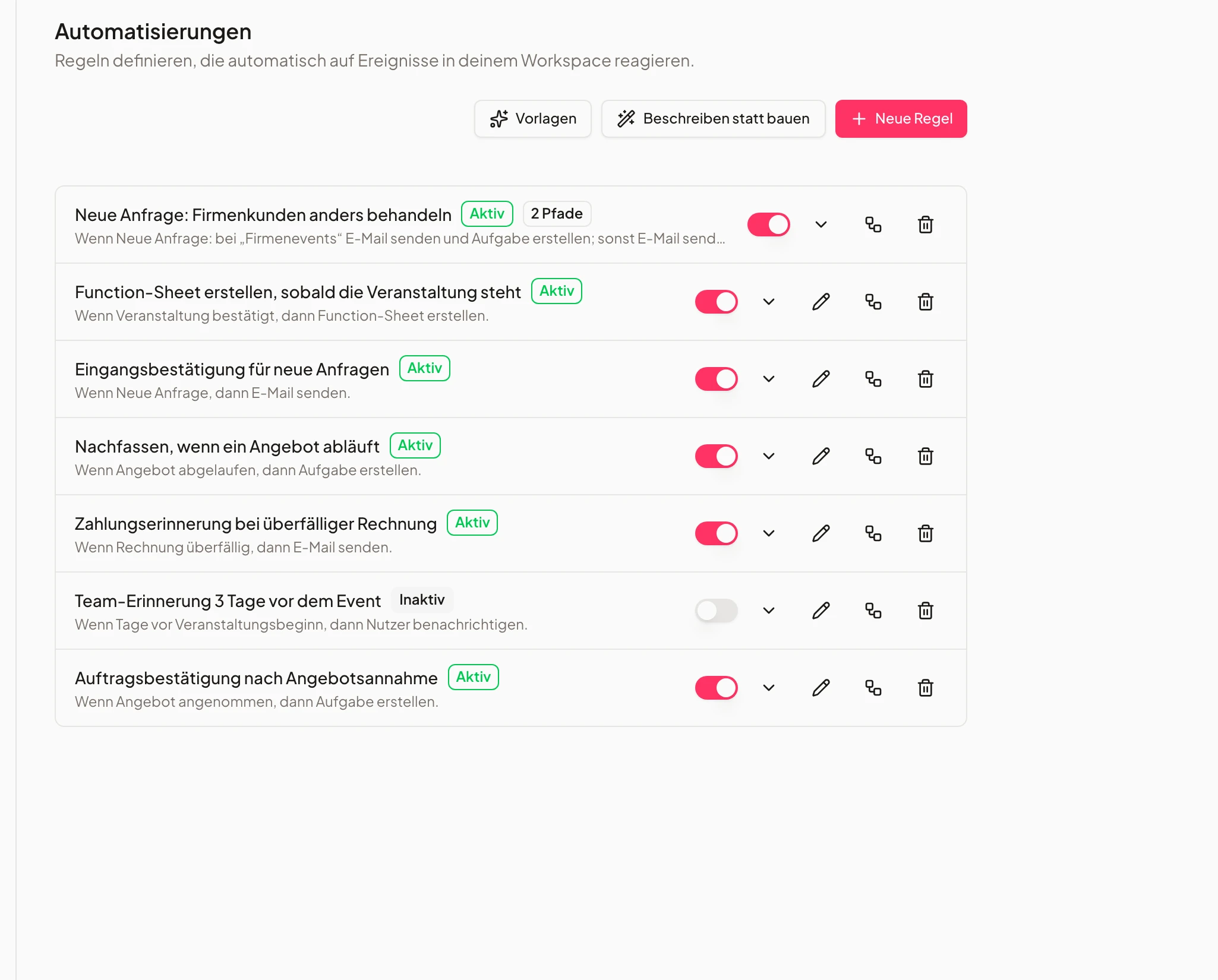
Every rule carries that sentence above it: “When an invoice is overdue, send an email.” Skim the list and you know what is running by itself in your business — without opening a single rule.
Each rule can be switched on and off on its own, and its history shows when it fired and what every action did. Switching off and deleting always works, on any plan.
- Plain-language sentence instead of a config form
- Every rule switched on or off individually
- History per rule: when, what, with what result
- 1Event is created
- 2Tasks & function sheet
- 3Deposit requested
Ready-made templates for the routines every business has
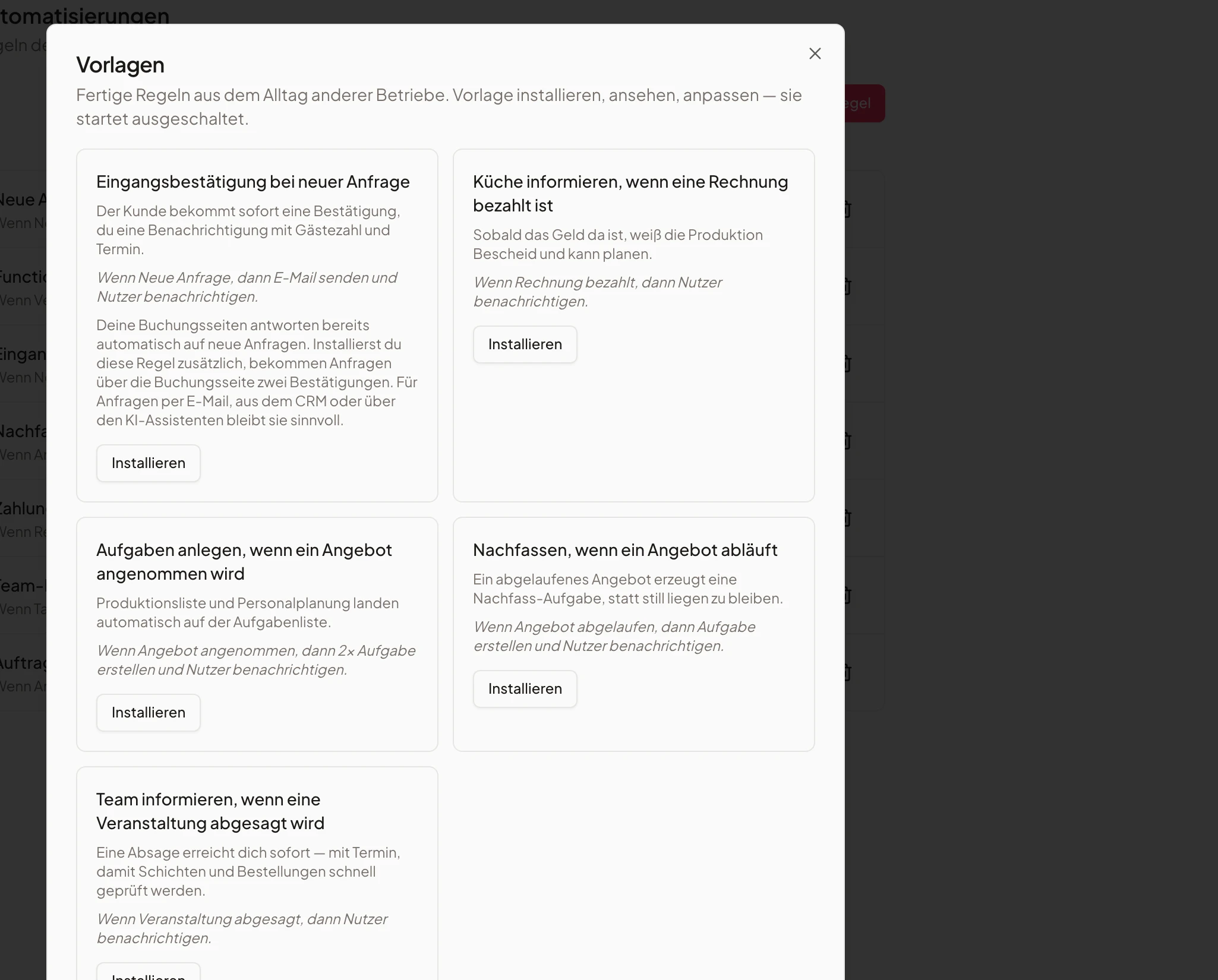
Install, review, adapt — it starts switched off.
Acknowledge a new enquiry, tell the kitchen once an invoice is paid, create tasks after a quote is accepted, follow up on an expired quote, inform the team about a cancellation. Install a template, look at the finished rule, adapt it to how you work. Three of the five run on any plan; the two that create tasks need Growth.
Univents warns you when a template overlaps with something already running: if your booking page already replies to enquiries automatically, that note sits on the template — otherwise the same customer would get two confirmations.
- Five templates, three of them on any plan
- Starts switched off so you read it first
- A warning when a template duplicates something
- Finalize menuopen
- Seating planin progress
- Tech checkdone
Branches: a corporate enquiry is not a wedding
Several paths in one rule — the first match runs.
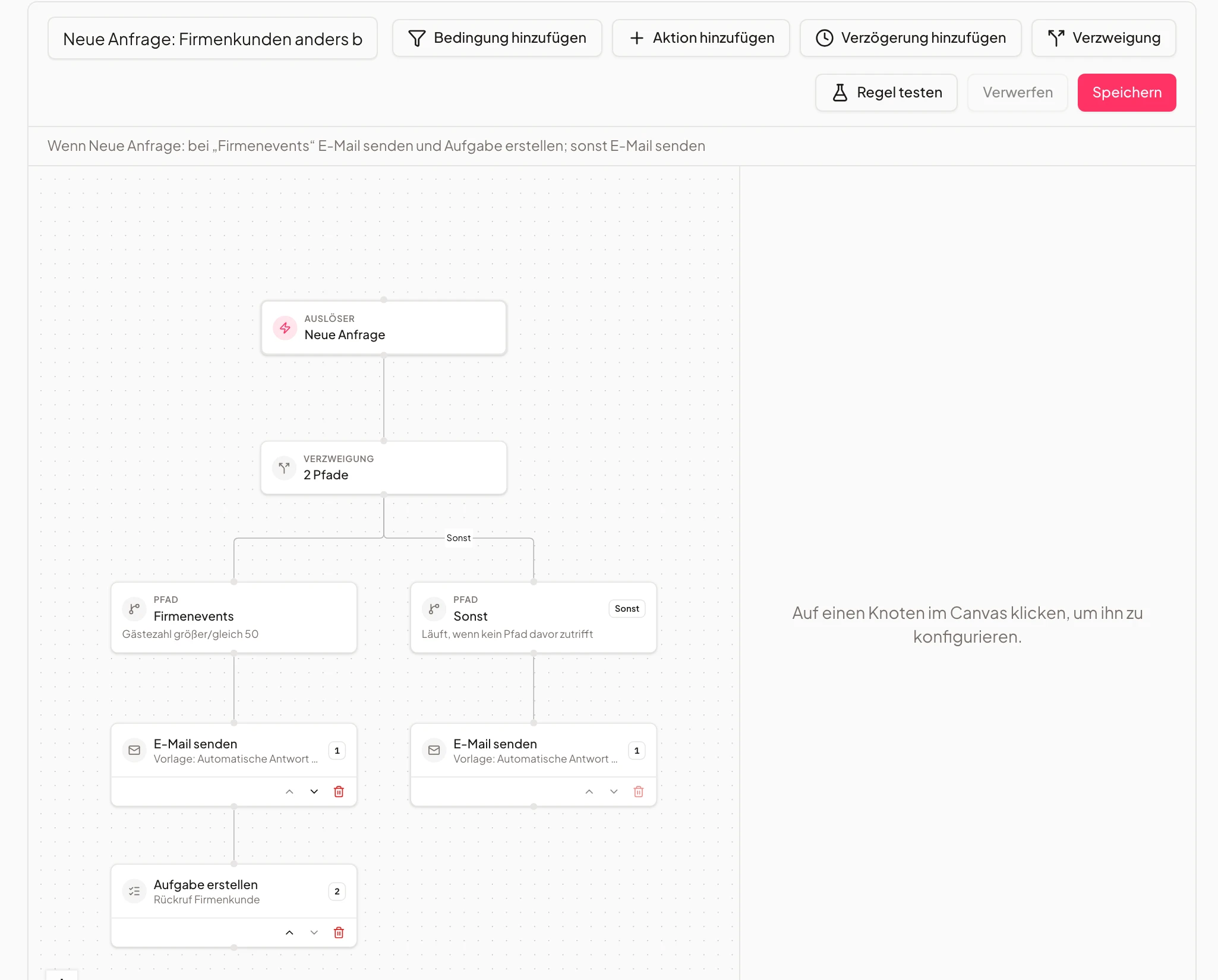
From Growth a rule can carry several paths, each with its own conditions: corporate events from 50 guests get a different reply and a callback task, everyone else gets the standard confirmation. The default path catches whatever fits none of the paths before it.
The canvas shows trigger, branch and actions as a flow instead of a chain of forms. A path's name shows up again in the history later and explains why the rule took that particular route.
- Paths with their own conditions (from Growth)
- First match wins, the default path catches the rest
- Canvas view with trigger, paths and actions
- 1Tasks & function sheet
- 2Team notified
- 3Deposit requested
Rules that create things — not just notify
Task, function sheet, production list, quote, run sheet.
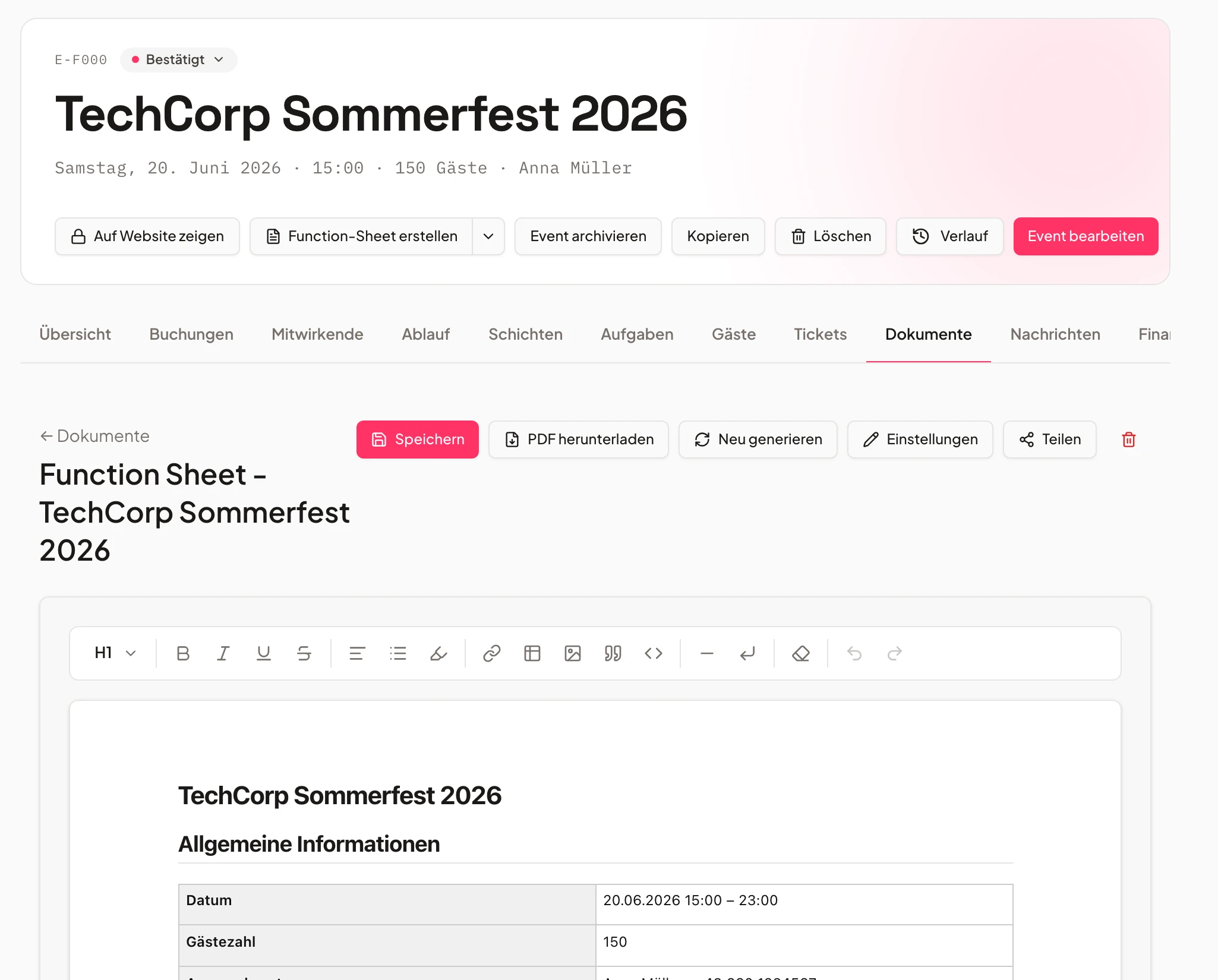
From Growth a rule creates what someone would otherwise create by hand: tasks from a template, the function sheet for a confirmed event, the production list for the kitchen, a quote from your own quote template, or the run sheet. Status changes and sending your own email templates come with it.
If you would rather not click at all, describe the rule in one sentence and have it built: Univents assembles trigger, conditions and actions, you check the result and save. That route ends in an ordinary rule you can edit like any other.
- Creator actions for tasks, kitchen and documents
- Change status & send your own email templates
- Have a rule built from one sentence (AI)
- Finalize menuopen
- Tech checkdone
Frequently asked questions
Do I need a bigger plan for this?
Not for the simple rule. One trigger, conditions, actions, one path — that is included in every plan, the free one as well. Growth is what you need for branches, for rules that create tasks, function sheets, production lists, quotes or run sheets, for status changes, for your own email templates and for the AI rule builder.
What happens to my rules if I change plan?
Existing rules keep running, even the ones using capabilities from the larger plan. You can view, switch off and delete them; editing them requires the plan that includes them. New rules can then be created as simple single-path rules again.
Can a rule email customers by accident?
Sending email is the point — but never unchecked. “Test rule” evaluates the rule against a real record and shows recipient, subject and the matching path while nothing goes out. Every installed template starts switched off, and any rule can be switched off again in one click.
Can Univents react to incoming email?
Yes, through the “email received” trigger on your connected mailbox. Only non-sending actions are allowed there, plus the AI reply draft: Univents writes the draft but never sends by itself — a person reads it and hits send. That is deliberate, otherwise a rule could reply to its own reply.
Can an action wait instead of running straight away?
Yes, by minutes, hours or days. When it resumes, the conditions can be checked again against the current state — so the payment reminder stays put if the invoice has been paid in the meantime.
How do I know a rule actually ran?
Every rule keeps a history: when it fired, which path applied and what each action did. For branched rules the path name is right there — which is why it pays to name paths in plain language.
Do I need to know anything about automation?
No. You pick a trigger from a list and actions from a list; the finished rule then reads as a sentence you could say out loud. From Growth you can describe it in one sentence instead and let the AI build it.
What happens when the AI balance runs out?
Those AI actions are skipped — classifying an incoming email and drafting a reply — and the rest of the rule still runs. No other action consumes AI credit.
Ready to get started?
Try Univents for free and see how simple event management can be.
Univents newsletter
Product news and practical tips for event and catering businesses. Roughly once a month, no more.