

Tutto sotto controllo – dalla pianificazione alla realizzazione
Che si tratti di festa aziendale, matrimonio o festival: con Univents tutti i partecipanti restano allineati. Programmi, spazi e attività si aggiornano in automatico, i contratti si firmano in digitale.
7 giorni gratis · nessuna carta di credito · operativo in pochi minuti
 Generato con IA
- Sala delle festeoccupata
- Terrazza giardinoopzione
Dillo e basta. Univents fa il resto.
Registra un memo vocale, collega la tua posta in arrivo o scrivi in chat – l'IA fa il resto. Ecco qualche esempio proprio per quest'area:
«Crea un evento nel salone – festa aziendale Schmidt AG, 23 agosto, 150 persone, serata dalle 18»
Evento creato
- Salone – Schmidt AG
- 23 agosto, ore 18:00
- 150 persone inserite
Esempio illustrativo. Hai sempre il controllo e approvi prima che qualcosa parta.
Così funziona la pianificazione degli eventi con Univents
Un processo chiaro: dall'idea all'evento concluso. Tutto collegato in un unico posto, senza copia-incolla.
Crea evento
I clienti compilano il tuo modulo di richiesta personalizzato. Ogni richiesta finisce automaticamente nell'evento giusto.
Niente caos di e-mail, niente inserimento manuale dei dati.
Crea preventivo
Univents crea in pochi secondi un preventivo completo con immagini, blocchi di testo e layout aziendale.
Preventivi che lasciano il segno: in automatico e nel tuo stile.
Realizza l'evento
Dopo l'accettazione del preventivo, Univents crea automaticamente l'evento, completo di Function Sheet e attività.
Dalla prenotazione alla produzione, tutto scorre in automatico.
Creating an event: date, venue, calendar
How a new event comes together in a few steps starting from an empty event list — from basic data through the date and venue to how it shows up on the calendar. At the end: how you copy an existing event for a follow-up occasion instead of entering everything again.
Capitoli
Mostra trascrizione
Let’s take a look at how to create an event manually in the system. At the top, under Events, there is the New event button. You can use one of your templates right away — in this case, though, we will start completely blank and fill in the event from scratch. Say we have a company party: we look up the matching contact, add the number of guests, and can select the on-site contact person at the customer and the project planner for the event. Then we set the payment method, so we know later, at a glance: pays by card, pays cash or pays by invoice. And instead of a single date, we can also create a whole recurring series as an event series. Next we pick the date — let’s say October 2nd at 4 pm — and can select the venue along with its seating layout. If you want a different location name to appear on the quote than the venue name, you can change that here, and you can also book additional rooms if the event takes place in more than one. You can also enter the address directly or use the customer’s address — Univents then calculates the travel distance automatically. If it should be calculated automatically, leave the distance field empty; otherwise you can enter it directly, so it is correctly reflected in the products priced by kilometer on the quote. You can also assign various tags, mainly for the sake of overview, so you know what each event belongs to. You can release events to specific people by tag — someone in group A, for example, only sees events tagged company party — and run different email automations depending on an event’s tags, more on that in another video. For the event color: leave it empty and the status color is used automatically; but you can also mark events of a certain type or at certain venues with their own color, so you can keep track more easily. Then you set the event’s language, and last but not least the kitchen details, which can also be preset completely. That done, you can create the event. And there we are in the event overview. Here you can add notes that also appear on the quote or in the function sheet, as well as internal notes meant only for you, and get an overall picture of the event. You can also upload images for the customer portal or look at the customer information again. Under Events, we now see all events sorted, with a summary of all the key information for each one at a glance, plus a timeline view and a status view — you can fully configure the statuses yourselves and move your events through them. And the overview is also available as a calendar, adjustable by month, week or day. If you want to create an event exactly the same way again, you can simply copy it and adjust it afterward, you can view the event’s edit history, and once an event is truly finished and should no longer be shown, you archive it.
Pianificazione eventi: dall'idea alla realizzazione
Un unico posto per ogni evento, a prescindere dalle dimensioni.
Pianifica eventi di ogni dimensione in un unico posto: dalle timeline alle attività fino all'approvazione. Tutto è collegato e aggiornato in tempo reale.
Timeline, attività e approvazioni sono collegate. Se sposti una data, tutti i passaggi dipendenti si adeguano automaticamente.
- Programmi con un numero illimitato di timeline
- Responsabilità e allegati per ogni punto del programma
- Creazione automatica da modelli

- 1Programma creato
- 2Attività assegnate
- 3Approvato
Collaboratori e team
Persone interne ed esterne che remano nella stessa direzione.
Gestisci collaboratori interni ed esterni, raggruppali per area di competenza e mantieni trasparenti le responsabilità.
Raggruppa i collaboratori per area di competenza e assegna accessi mirati: ognuno vede esattamente ciò che serve al suo ruolo.
- Gruppi e ruoli per i collaboratori
- Inserimento automatico nei Function Sheet
- Gli esterni vedono solo i contenuti approvati

- Team di servizio6 persone
- Crew tecnicaconfermata
- Fioristaesterno
Contratti e accordi
Contratto creato e firmato, senza Word.
Crea e firma i contratti direttamente nel sistema, compilati automaticamente con i dati dell'evento.
I contratti si compilano da soli con i dati dell'evento e vengono firmati direttamente nel sistema, con piena validità legale.
- Segnaposto per nomi, date e indirizzi
- Firma digitale nello strumento
- Versioni e archiviazione centrale

Location e sale
Sale, edifici e aree esterne sotto controllo.
Gestisci sale, edifici e aree esterne con capienza, caratteristiche e calendari, tutto collegato agli eventi.
Capienza, caratteristiche e un calendario dedicato per ogni sala: le doppie prenotazioni sono così escluse.
- Capienza e dotazioni per sala
- Gruppi di sale e prenotazioni combinate
- Sincronizzazione con calendario esterno

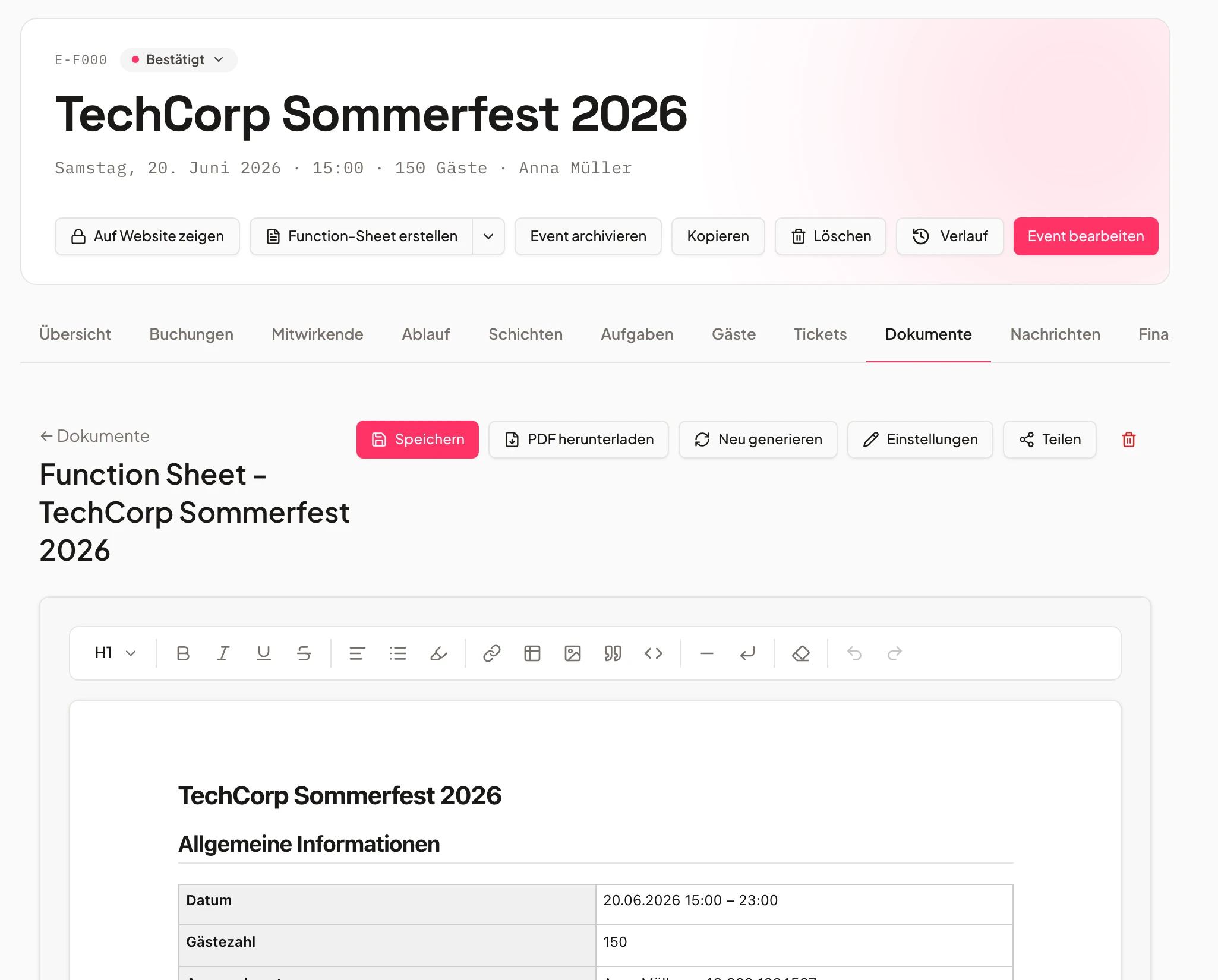
Function Sheet automatici
Function Sheet che si scrivono da soli.
Univents crea automaticamente i Function Sheet dai dati dell'evento, per cucina, servizio, tecnica o cliente.
Univents trasforma i dati dell'evento in Function Sheet chiari per cucina, servizio e tecnica, sempre aggiornati.
- Creazione automatica da evento e programma
- Contenuti e layout liberamente modificabili
- Filtri per area, orario o team
Attività e gestione dei progetti
Ogni attività al posto giusto.
Collega le attività direttamente a punti del programma, eventi o persone e rispetta i tempi con promemoria automatici.
Collega le attività a punti del programma, eventi o persone e tieni tutto sotto controllo con promemoria automatici.
- Tipi di attività (upload, testo libero, conferma)
- Promemoria automatici alla scadenza
- Processi di revisione e approvazione

- Finalizzare il menuaperta
- Piano dei tavoliin corso
- Controllo tecnicocompletata
Vedi subito quale data è libera
Un clic sul calendario mostra occupazione e giorni liberi – così non avrai mai più doppie prenotazioni.
Domande frequenti
Cosa posso gestire con la pianificazione di eventi e location?
Eventi dall'idea alla realizzazione: programmi con più timeline, attività, contratti, collaboratori, documenti e sale, tutto collegato.
I Function Sheet vengono creati automaticamente?
Sì. Univents genera i Function Sheet in automatico dai dati di evento, turni e timeline, modificabili liberamente e filtrabili per area, orario o team.
Posso gestire sale e gruppi di sale?
Sì, comprese capienza e dotazioni per sala, gruppi di sale, prenotazioni combinate e blocco in caso di doppie prenotazioni.
I partner esterni vedono solo i contenuti approvati?
Sì. Gli esterni vedono esclusivamente i contenuti approvati e possono rispondere direttamente nel contesto dell'evento.
Univents si sincronizza con i calendari esterni?
Sì. Eventi, sale e punti del programma si sincronizzano con i calendari esterni.
Pronto a iniziare?
Prova Univents gratis e scopri quanto può essere semplice la gestione degli eventi.
Newsletter di Univents
Novità di prodotto e consigli pratici per attività di eventi e catering. Circa una volta al mese, non di più.
La newsletter viene inviata in inglese.