

Il tuo team – pianificato, rilevato, retribuito
Che si tratti di dipendenti fissi o di personale extra: Univents ti mostra in ogni momento chi lavora quando, cosa è stato fatto e quali costi ne derivano. Così il piano del personale resta chiaro e la contabilizzazione senza errori.
7 giorni gratis · nessuna carta di credito · operativo in pochi minuti
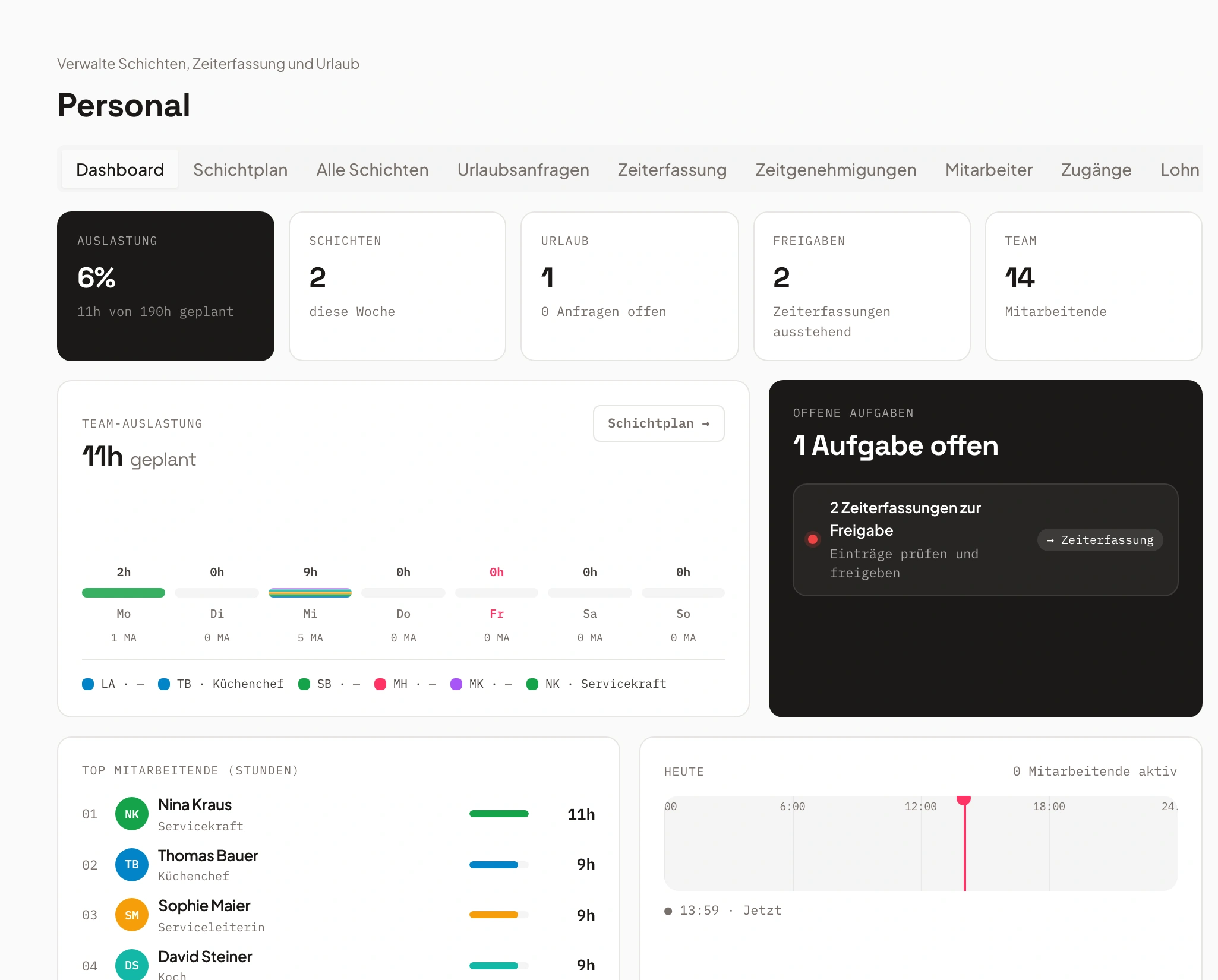
- Servizio sabato3 aperti
- Cucina venerdìcoperto
Dillo e basta. Univents fa il resto.
Registra un memo vocale, collega la tua posta in arrivo o scrivi in chat – l'IA fa il resto. Ecco qualche esempio proprio per quest'area:
«Inserisci Lisa sabato alle 18 al servizio, fino alle 23, evento Rooftop.»
Turno inserito
- Dipendente: Lisa Bauer
- Sabato, 18:00–23:00
- Ruolo: servizio
Esempio illustrativo. Hai sempre il controllo e approvi prima che qualcosa parta.
Come funziona la pianificazione del personale con Univents
Un processo chiaro – dal piano turni all'export delle retribuzioni. Tutto collegato, niente Excel, niente doppio lavoro.
Pianifica i turni
Crea i turni direttamente nell'evento o in modo trasversale – con ruoli, orari e attività. Il personale extra può iscriversi da solo.
Responsabilità chiare e distribuzione equa – senza continue richieste di chiarimento.
Rileva le ore
I dipendenti timbrano in digitale. Pause e supplementi notturni e festivi vengono considerati automaticamente.
Rilevazione delle presenze a norma di legge, senza errori di calcolo né elenchi Excel.
Esporta le retribuzioni
Tutti gli orari rilevati confluiscono direttamente nel costo del lavoro e nell'export fiscale – incluse ferie e supplementi.
Contabilizzazione corretta in minuti anziché in ore.
Planning and staffing shifts
A job bundles one or more shifts on an event — who’s needed, for how long, and at what rate. See how to create and staff them on the event, the schedule across multiple days, planned hours per event, and the scheduling board across a full week.
Capitoli
Mostra trascrizione
Let’s look at how shift planning actually works in the system. On one hand, there’s the Staff area, where you can add individual shifts directly for specific days and people. And you also have the option to set them up right from within the event itself. From there we go into Shifts and can create new jobs. Jobs are especially useful because you can assign specific skills to them – the qualifications required. That lets you define who’s actually allowed to apply for a given job. We’ll add that here, set the address, and add the new job. From the job, you can then add further shifts. That means you can name each shift, enter the times for it, and also say how many staff members you need – or whether people can sign themselves up for the shift through the staff portal. You can also search for people yourself and add them, and assign a contact person for each shift, or price the shifts directly here. So we can say we have our shift for the service staff set up right here. The system also does the math for you: four hours times three people needed for the event, and that’s included directly. We create that. And we create a second shift, Supervision, the same way. Then you get an overview of your shifts right here. From there, people can apply for them. If you’re working the event yourself, you can start your shifts directly, or copy individual jobs, or save them as a template. That means all these shifts and jobs are also available here as templates – you can insert items from templates to save yourself a good amount of time. You also have the option to view everything by job in a timeline, or by the individual people assigned to each task. On top of that, you can send reminders to people from here – either by tags, by skills, or by crew group – asking them to please apply for the open items. If you go in here and, say, someone’s already assigned to one of your shifts – let’s add myself to the shift – you can then say: if that person calls in sick, you can mark them as sick. And the system can also find a replacement for you. It automatically checks who’s still available that day, so you can add them in. It also works like this: if you go into the Finance tab, you see your planned versus actual hours. We’ve planned 136 hours here, which you can also manually adjust or set outright. And you have the tracked hours – whenever someone logs their shifts on the event, that flows straight into the planned-versus-actual view. From there you get an overview of how many hours were planned and how many were actually tracked. The rates for those hours are also calculated automatically, so you immediately see how much you’ll bill the customer if you’re charging by the hour rather than a flat fee – and at the same time you see how your cost coverage looks for the event. In the Shifts area, as we saw before, there’s also the shift plan with an overview by day. And from here you can also see the overall view of all shifts, as well as the overall view of all time entries and the overall view of the hours still waiting for approval.
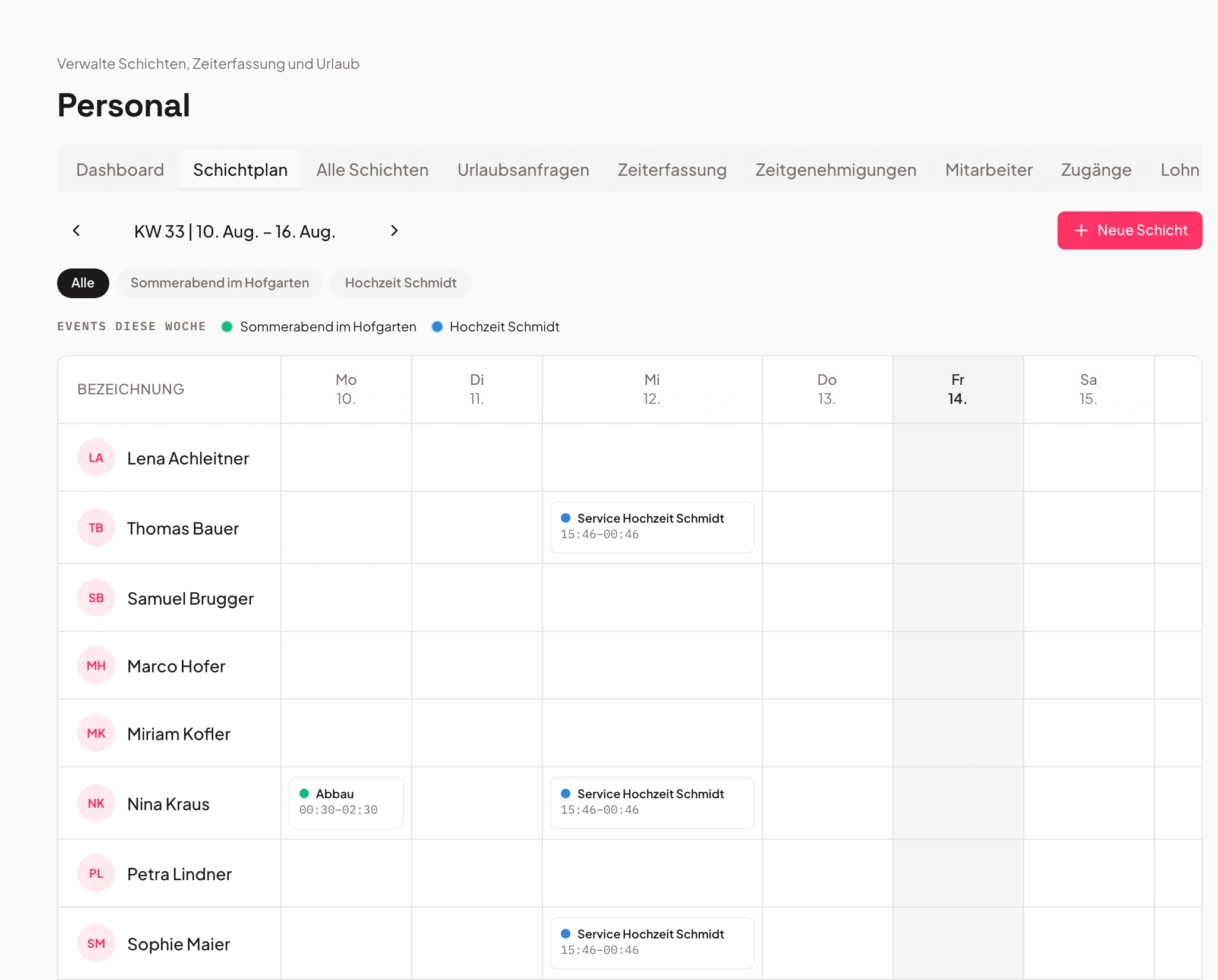
Pianificazione dei turni – chiara, flessibile, integrata
Tutti i turni sotto controllo – per ogni evento, ogni team.
Pianifica tutti i turni in un unico posto, per singoli eventi o per impieghi ricorrenti.
Il personale extra può candidarsi ai posti liberi e le responsabilità sono subito visibili – niente richieste di chiarimento, niente caos.
- Pianificazione dei turni per evento o trasversale tra i team
- Funzione di candidatura per il personale extra
- Collegamento con prodotti e attività
Rilevazione delle presenze – semplice e a norma di legge
La rilevazione delle presenze a norma di legge funziona in automatico in background.
I dipendenti registrano gli orari direttamente in digitale – da app o desktop. Il sistema riconosce le pause e controlla i tempi di riposo.
Pause, orari di blocco e saldi orari vengono verificati dal sistema. L'approvazione dell'admin richiede un solo clic.
- Regole automatiche per pause e orari di blocco
- Saldi orari con ore in più e in meno
- Approvazione dell'admin prima della contabilizzazione

- 1Pausa rilevata
- 2Saldo calcolato
- 3Approvato
Costo del lavoro – si calcola da solo
Costi del personale in tempo reale – senza groviglio di tabelle.
Dagli orari rilevati si ricava automaticamente il costo del lavoro – inclusi supplementi notturni, festivi e domenicali.
Supplementi notturni, festivi e domenicali confluiscono automaticamente. Vedi il costo del personale per evento a colpo d'occhio.
- Calcolo automatico dei supplementi
- Integrazione nei documenti finanziari
- Panoramica live dei costi del personale

Gestione di ferie e assenze
Ferie, malattia, sostituzioni – tutto in un unico sistema.
Ferie, giorni di malattia e sostituzioni passano dallo stesso sistema – approvati dai responsabili competenti.
Le richieste di ferie si approvano o si rifiutano direttamente. La logica dei festivi si adatta automaticamente alla sede.
- Richieste di ferie e approvazioni direttamente nello strumento
- Suggerimenti automatici di sostituzione
- Logica dei festivi per sede

- Ferie maggioapprovate
- Malattiasegnalato
- Sostituzionepianificato
Export retribuzioni per il fisco e report
Export con un clic – compatibile con i più comuni software di contabilità.
Con un clic ottieni dati puliti e a norma di legge per il commercialista o la contabilità.
Giorni di ferie e di supplemento sono inclusi. Il tuo commercialista riceve numeri puliti e verificati.
- Export per periodo e dipendente
- Ferie e giorni con supplementi inclusi
- Fa risparmiare tempo e garantisce numeri corretti

Ruoli e competenze
Sempre la persona giusta per l'impiego giusto.
Etichetta i dipendenti in base alle competenze (ad es. cucina, servizio, autista) – così la persona giusta finisce sempre nell'impiego giusto.
I tag di competenza semplificano l'assegnazione. I nuovi turni vengono proposti dal sistema già con il personale adatto.
- Assegnazione dei turni in base alle competenze
- Collaboratori interni ed esterni
- Qualifiche per ruolo

- Cucina12 crew
- Sala20 crew
- Autista6 crew
Piano turni – provalo subito
Clicca su uno slot libero e scopri com'è facile coprire i turni.
«Tutto è collegato — prenotazione, cucina, personale, fatturazione. Niente più caos, nemmeno con dieci eventi in contemporanea.»
Domande frequenti
Cosa copre la pianificazione del personale?
Pianificazione dei turni, rilevazione delle presenze, supplementi e regole sulle pause automatici, gestione delle ferie ed export delle retribuzioni/fiscale.
I supplementi vengono calcolati automaticamente?
Sì. Logica intelligente dei supplementi per orario, giorno della settimana e festivo — comprese le regole sulle pause.
Come funziona la rilevazione delle presenze?
Il personale extra registra gli orari e richiede le ferie; rilevazione ed export avvengono in un unico passaggio.
Posso pianificare per reparti e centri di costo?
Sì. Gestione di reparti/centri di costo e logica delle sostituzioni sono inclusi.
Esiste un export delle retribuzioni?
Sì. Export delle retribuzioni e fiscale per la contabilizzazione con un clic.
Pronto a iniziare?
Prova Univents gratis e scopri quanto può essere semplice la gestione degli eventi.
Newsletter di Univents
Novità di prodotto e consigli pratici per attività di eventi e catering. Circa una volta al mese, non di più.
La newsletter viene inviata in inglese.