

Tu equipo – planificado, registrado y liquidado
Tanto si son empleados fijos como eventuales: Univents te muestra en todo momento quién trabaja cuándo, qué se ha hecho y qué costes se generan. Así tu planificación de personal se mantiene clara y tu liquidación, sin errores.
7 días gratis · sin tarjeta de crédito · listo en minutos
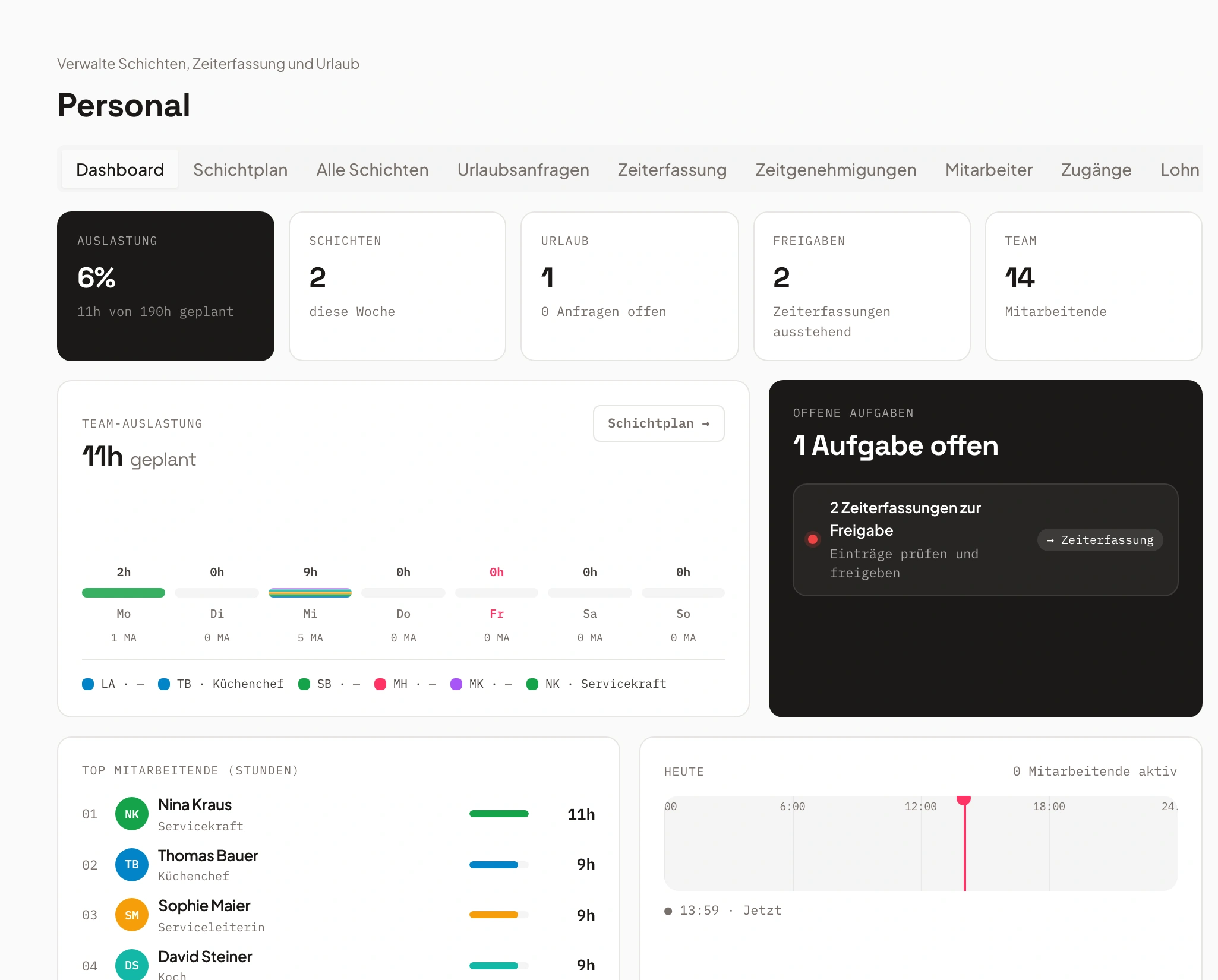
- Servicio sábado3 abiertos
- Cocina viernescubierto
Dilo y ya. Univents hace el resto.
Díctalo, conecta tu bandeja de entrada o escribe en el chat: la IA hace el resto. Unos ejemplos de justo esta área:
«Apunta a Lisa el sábado a las 18:00 en servicio, hasta las 23:00, evento Rooftop.»
Turno añadido
- Empleada: Lisa Bauer
- Sábado, 18:00–23:00
- Rol: servicio
Representación de ejemplo. Siempre mantienes el control y das tu aprobación antes de que salga nada.
Así funciona tu planificación de personal con Univents
Un proceso claro: del cuadrante de turnos a la exportación de salarios. Todo conectado, sin Excel ni trabajo duplicado.
Planificar turnos
Crea turnos directamente en el evento o de forma transversal, con roles, horarios y tareas. Los eventuales pueden apuntarse ellos mismos.
Responsabilidades claras y reparto justo, sin preguntas constantes.
Registrar el tiempo
Los empleados fichan en digital. Las pausas y los recargos nocturnos y de festivos se tienen en cuenta automáticamente.
Registro de tiempo conforme a la ley, sin errores de cálculo ni listas de Excel.
Exportar salarios
Todos los tiempos registrados pasan directamente a los costes salariales y a la exportación fiscal, incluidas las vacaciones y los recargos.
Liquidación correcta en minutos en lugar de horas.
Planning and staffing shifts
A job bundles one or more shifts on an event — who’s needed, for how long, and at what rate. See how to create and staff them on the event, the schedule across multiple days, planned hours per event, and the scheduling board across a full week.
Capítulos
Mostrar transcripción
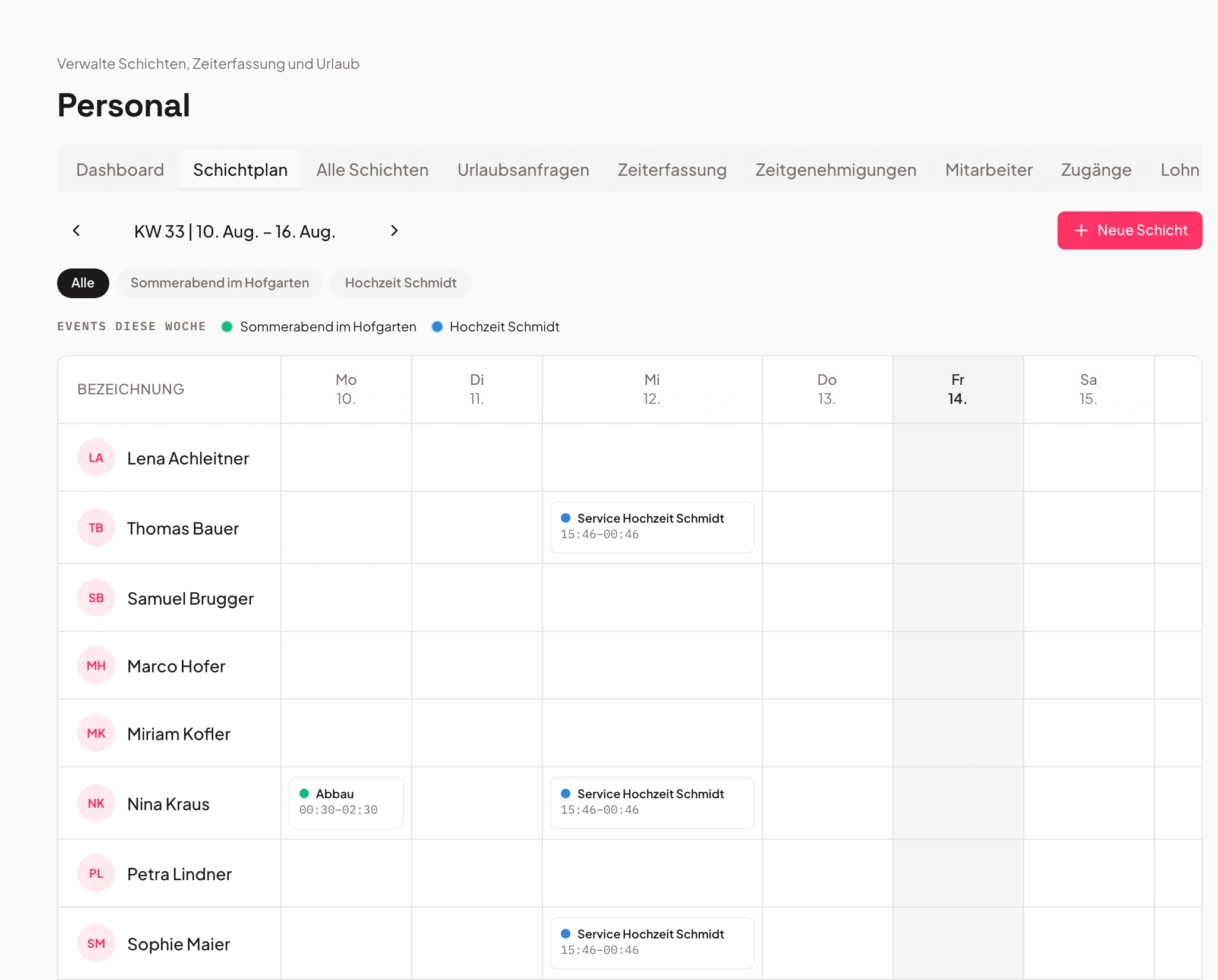
Let’s look at how shift planning actually works in the system. On one hand, there’s the Staff area, where you can add individual shifts directly for specific days and people. And you also have the option to set them up right from within the event itself. From there we go into Shifts and can create new jobs. Jobs are especially useful because you can assign specific skills to them – the qualifications required. That lets you define who’s actually allowed to apply for a given job. We’ll add that here, set the address, and add the new job. From the job, you can then add further shifts. That means you can name each shift, enter the times for it, and also say how many staff members you need – or whether people can sign themselves up for the shift through the staff portal. You can also search for people yourself and add them, and assign a contact person for each shift, or price the shifts directly here. So we can say we have our shift for the service staff set up right here. The system also does the math for you: four hours times three people needed for the event, and that’s included directly. We create that. And we create a second shift, Supervision, the same way. Then you get an overview of your shifts right here. From there, people can apply for them. If you’re working the event yourself, you can start your shifts directly, or copy individual jobs, or save them as a template. That means all these shifts and jobs are also available here as templates – you can insert items from templates to save yourself a good amount of time. You also have the option to view everything by job in a timeline, or by the individual people assigned to each task. On top of that, you can send reminders to people from here – either by tags, by skills, or by crew group – asking them to please apply for the open items. If you go in here and, say, someone’s already assigned to one of your shifts – let’s add myself to the shift – you can then say: if that person calls in sick, you can mark them as sick. And the system can also find a replacement for you. It automatically checks who’s still available that day, so you can add them in. It also works like this: if you go into the Finance tab, you see your planned versus actual hours. We’ve planned 136 hours here, which you can also manually adjust or set outright. And you have the tracked hours – whenever someone logs their shifts on the event, that flows straight into the planned-versus-actual view. From there you get an overview of how many hours were planned and how many were actually tracked. The rates for those hours are also calculated automatically, so you immediately see how much you’ll bill the customer if you’re charging by the hour rather than a flat fee – and at the same time you see how your cost coverage looks for the event. In the Shifts area, as we saw before, there’s also the shift plan with an overview by day. And from here you can also see the overall view of all shifts, as well as the overall view of all time entries and the overall view of the hours still waiting for approval.
Planificación de turnos: clara, flexible e integrada
Todos los turnos a la vista, para cada evento y cada equipo.
Planifica todos los turnos en un solo lugar, ya sea para eventos concretos o para servicios recurrentes.
Los eventuales pueden postularse a los huecos abiertos y las responsabilidades se ven al instante: sin preguntas, sin caos.
- Planificación de turnos por evento o entre equipos
- Función de solicitud para eventuales
- Vinculación con productos y tareas
Registro de tiempo: sencillo y conforme a la ley
El registro de tiempo conforme a la ley funciona solo en segundo plano.
Los empleados registran sus tiempos directamente en digital, desde la app o el escritorio. El sistema detecta las pausas y comprueba los descansos.
El sistema comprueba las pausas, los tiempos de bloqueo y los saldos de tiempo. El admin lo aprueba con un clic.
- Reglas automáticas de pausas y tiempos de bloqueo
- Saldos de tiempo con horas extra y horas a deber
- Aprobación del admin antes de la liquidación

- 1Pausa detectada
- 2Saldo calculado
- 3Aprobado
Costes salariales: se calculan solos
Costes de personal en tiempo real – sin líos de hojas de cálculo.
Los tiempos registrados se convierten automáticamente en costes salariales, incluidos los recargos nocturnos, de festivos y de domingos.
Los recargos nocturnos, de festivos y de domingos se incluyen automáticamente. Ves el gasto de personal de cada evento de un vistazo.
- Cálculo automático de recargos
- Integración en documentos financieros
- Vista en directo del gasto de personal

Gestión de vacaciones y ausencias
Vacaciones, enfermedad, sustituciones – todo en un solo sistema.
Vacaciones, bajas por enfermedad y sustituciones se gestionan en el mismo sistema, con la aprobación de los responsables correspondientes.
Las solicitudes de vacaciones se aprueban o rechazan directamente. La lógica de festivos se adapta automáticamente a cada sede.
- Solicitudes y aprobaciones de vacaciones en la herramienta
- Propuestas automáticas de sustitución
- Lógica de festivos por sede

- Vacaciones mayoaprobado
- Baja por enfermedadcomunicado
- Sustituciónplanificado
Exportación fiscal de salarios e informes
Exportación con un clic – compatible con la contabilidad habitual.
Con un clic obtienes datos limpios y conformes a la ley para tu asesor fiscal o la contabilidad.
Se incluyen las vacaciones y los días con recargo. Tu asesor fiscal recibe cifras limpias y verificadas.
- Exportación por periodo y empleado
- Incluye las vacaciones y los días con recargo
- Ahorra tiempo y garantiza cifras correctas

Roles y habilidades
Siempre la persona adecuada para el servicio adecuado.
Etiqueta a los empleados por habilidades (p. ej., cocina, servicio, conductor) para que la persona adecuada acabe siempre en el servicio adecuado.
Las etiquetas de habilidades facilitan la asignación. El sistema propone los nuevos turnos ya con el personal adecuado.
- Asignación de turnos según habilidades
- Colaboradores internos y externos
- Cualificaciones por rol

- Cocina12 crew
- Servicio20 crew
- Conductor6 crew
Cuadrante de turnos – pruébalo ahora
Haz clic en un hueco libre y comprueba lo fácil que es cubrir turnos.
«Todo está conectado — reservas, cocina, personal, facturación. Se acabó el caos, incluso con diez eventos a la vez.»
Preguntas frecuentes
¿Qué cubre la planificación de personal?
Planificación de turnos, registro de tiempo, recargos y pausas automáticos, gestión de vacaciones y exportación de salarios y datos fiscales.
¿Los recargos se calculan automáticamente?
Sí. Lógica inteligente de recargos según la hora, el día de la semana y los festivos, incluidas las reglas de pausas.
¿Cómo funciona el registro de tiempo?
Los eventuales registran sus tiempos y solicitan vacaciones; el registro y la exportación se hacen en un solo paso.
¿Puedo planificar por departamentos y centros de coste?
Sí. La gestión de departamentos y centros de coste y la lógica de sustituciones están incluidas.
¿Hay exportación de salarios?
Sí. Exportación de salarios y datos fiscales para la liquidación con un clic.
¿Listo para empezar?
Prueba Univents gratis y descubre lo sencilla que puede ser la gestión de eventos.
Newsletter de Univents
Novedades del producto y consejos prácticos para empresas de eventos y catering. Aproximadamente una vez al mes, no más.
La newsletter se envía en inglés.