

Jouw team – ingepland, geregistreerd, afgerekend
Of het nu vaste medewerkers of oproepkrachten zijn: Univents laat je altijd zien wie wanneer werkt, wat er is gepresteerd en welke kosten ontstaan. Zo blijft je personeelsplanning overzichtelijk en je afrekening foutloos.
7 dagen gratis · geen creditcard · in minuten startklaar
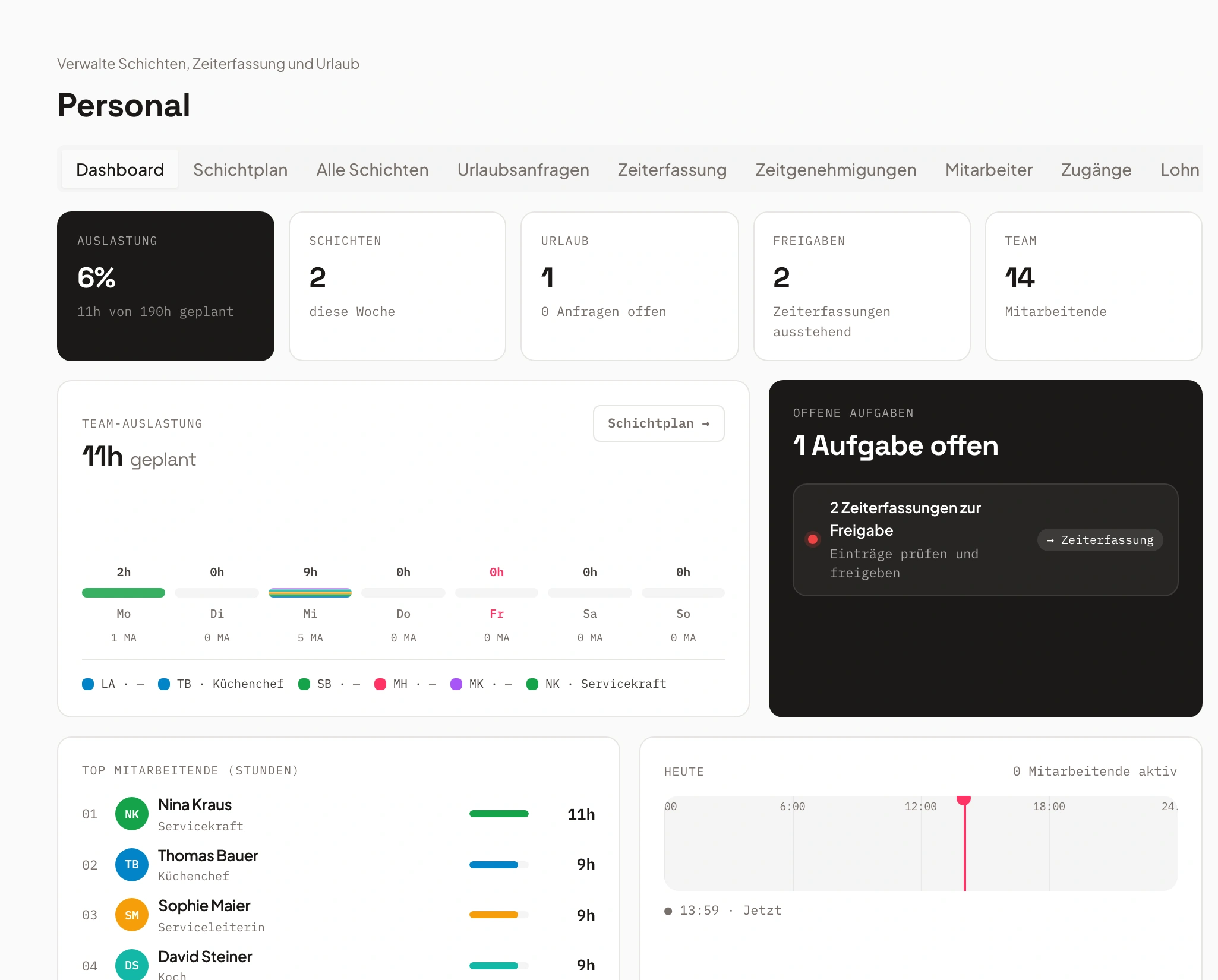
- Bediening zaterdag3 open
- Keuken vrijdagbezet
Zeg het gewoon. Univents doet de rest.
Spreek het in, koppel je inbox of typ in de chat – de AI doet de rest. Een paar voorbeelden voor precies dit onderdeel:
“Zet Lisa zaterdag om 18 uur in de bediening, tot 23 uur, evenement Rooftop.”
Dienst toegevoegd
- Medewerker: Lisa Bauer
- Zaterdag, 18:00–23:00 uur
- Rol: Bediening
Voorbeeldweergave. Jij houdt altijd de controle en geeft akkoord voordat er iets uitgaat.
Zo werkt je personeelsplanning met Univents
Eén duidelijk proces – van dienstrooster tot loonexport. Alles gekoppeld, geen Excel, geen dubbel werk.
Diensten plannen
Maak diensten direct in het evenement of evenementoverstijgend aan – met rollen, tijden en taken. Oproepkrachten kunnen zichzelf inschrijven.
Duidelijke verantwoordelijkheden en eerlijke verdeling – zonder voortdurende vragen.
Tijden registreren
Medewerkers klokken digitaal in. Pauzes en toeslagen voor nacht- en feestdagen worden automatisch meegenomen.
Wettelijk conforme tijdregistratie zonder rekenfouten of Excel-lijsten.
Lonen exporteren
Alle geregistreerde tijden vloeien direct door naar de loonkosten en de belastingexport – inclusief vakantie en toeslagen.
Correcte afrekening in minuten in plaats van uren.
Planning and staffing shifts
A job bundles one or more shifts on an event — who’s needed, for how long, and at what rate. See how to create and staff them on the event, the schedule across multiple days, planned hours per event, and the scheduling board across a full week.
Hoofdstukken
Transcript tonen
Let’s look at how shift planning actually works in the system. On one hand, there’s the Staff area, where you can add individual shifts directly for specific days and people. And you also have the option to set them up right from within the event itself. From there we go into Shifts and can create new jobs. Jobs are especially useful because you can assign specific skills to them – the qualifications required. That lets you define who’s actually allowed to apply for a given job. We’ll add that here, set the address, and add the new job. From the job, you can then add further shifts. That means you can name each shift, enter the times for it, and also say how many staff members you need – or whether people can sign themselves up for the shift through the staff portal. You can also search for people yourself and add them, and assign a contact person for each shift, or price the shifts directly here. So we can say we have our shift for the service staff set up right here. The system also does the math for you: four hours times three people needed for the event, and that’s included directly. We create that. And we create a second shift, Supervision, the same way. Then you get an overview of your shifts right here. From there, people can apply for them. If you’re working the event yourself, you can start your shifts directly, or copy individual jobs, or save them as a template. That means all these shifts and jobs are also available here as templates – you can insert items from templates to save yourself a good amount of time. You also have the option to view everything by job in a timeline, or by the individual people assigned to each task. On top of that, you can send reminders to people from here – either by tags, by skills, or by crew group – asking them to please apply for the open items. If you go in here and, say, someone’s already assigned to one of your shifts – let’s add myself to the shift – you can then say: if that person calls in sick, you can mark them as sick. And the system can also find a replacement for you. It automatically checks who’s still available that day, so you can add them in. It also works like this: if you go into the Finance tab, you see your planned versus actual hours. We’ve planned 136 hours here, which you can also manually adjust or set outright. And you have the tracked hours – whenever someone logs their shifts on the event, that flows straight into the planned-versus-actual view. From there you get an overview of how many hours were planned and how many were actually tracked. The rates for those hours are also calculated automatically, so you immediately see how much you’ll bill the customer if you’re charging by the hour rather than a flat fee – and at the same time you see how your cost coverage looks for the event. In the Shifts area, as we saw before, there’s also the shift plan with an overview by day. And from here you can also see the overall view of all shifts, as well as the overall view of all time entries and the overall view of the hours still waiting for approval.
Dienstplanning – duidelijk, flexibel, geïntegreerd
Alle diensten in beeld – voor elk evenement, elk team.
Plan alle diensten centraal, of het nu om losse evenementen of terugkerende inzetten gaat.
Oproepkrachten kunnen solliciteren op open plekken, verantwoordelijkheden zijn direct zichtbaar – geen vragen achteraf, geen chaos.
- Dienstplanning per evenement of teamoverstijgend
- Inschrijffunctie voor oproepkrachten
- Koppeling met producten en taken
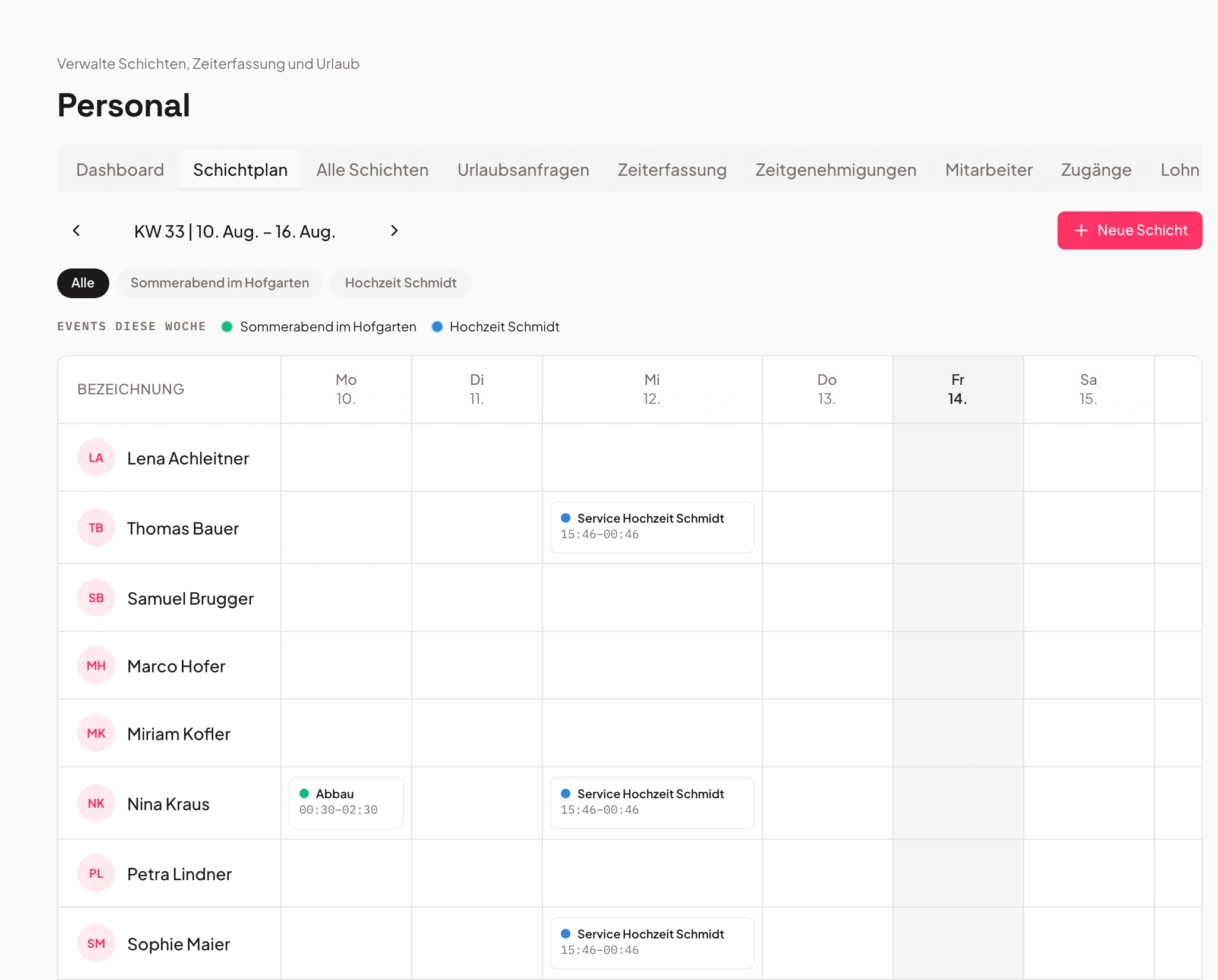
Tijdregistratie – eenvoudig & conform de wet
Wettelijk conforme tijdregistratie draait automatisch op de achtergrond.
Medewerkers registreren tijden direct digitaal – via app of desktop. Het systeem herkent pauzes en controleert rusttijden.
Pauzes, blokkeertijden en tijdsaldi worden door het systeem gecontroleerd. Goedkeuring door een admin gaat met één klik.
- Automatische regels voor pauzes en blokkeertijden
- Tijdsaldi met plus- en minuren
- Admin-goedkeuring vóór afrekening

- 1Pauze herkend
- 2Saldo berekend
- 3Goedgekeurd
Loonkosten – berekenen zichzelf
Personeelskosten in realtime – geen wirwar van spreadsheets.
Uit geregistreerde tijden worden automatisch loonkosten – inclusief toeslagen voor nacht-, feestdag- en zondagwerk.
Toeslagen voor nacht-, feestdag- en zondagwerk worden automatisch meegenomen. Je ziet de personeelskosten per evenement in één oogopslag.
- Automatische toeslagberekening
- Integratie in financiële documenten
- Live overzicht van personeelskosten

Vakantie- & afwezigheidsbeheer
Vakantie, ziekte, vervanging – alles in één systeem.
Vakanties, ziektedagen en vervangingen lopen via hetzelfde systeem – goedgekeurd door de verantwoordelijke managers.
Vakantieaanvragen worden direct goedgekeurd of afgewezen. De feestdaglogica past zich automatisch aan per vestiging.
- Vakantieaanvragen & goedkeuringen in de tool
- Automatische vervangingsvoorstellen
- Feestdaglogica per vestiging

- Vakantie meigoedgekeurd
- Ziekgemeld
- Vervanginggepland
Export loonbelasting & rapportage
Export met één klik – compatibel met gangbare boekhoudsoftware.
Met één klik krijg je schone, rechtszekere gegevens voor je boekhouder of administratie.
Vakantie- en toeslagdagen zijn inbegrepen. Je boekhouder krijgt schone, gecontroleerde cijfers.
- Export per periode & medewerker
- Inclusief vakantie- en toeslagdagen
- Bespaart tijd en garandeert correcte cijfers

Rollen & vaardigheden
Altijd de juiste persoon voor de juiste dienst.
Tag medewerkers op vaardigheden (bijv. keuken, bediening, chauffeur) – zo komt altijd de juiste persoon op de juiste plek.
Skill-tags maken toewijzen eenvoudig. Nieuwe diensten stelt het systeem al passend bemand voor.
- Dienstindeling op basis van vaardigheden
- Interne & externe bijdragers
- Kwalificaties per rol

- Keuken12 crew
- Bediening20 crew
- Chauffeur6 crew
Dienstrooster – probeer direct uit
Klik op een open plek en zie hoe eenvoudig diensten worden ingevuld.
“Alles hangt samen — boeking, keuken, personeel, facturatie. Geen chaos meer, zelfs niet bij tien evenementen tegelijk.”
Veelgestelde vragen
Wat omvat de personeelsplanning?
Dienstplanning, tijdregistratie, automatische toeslagen en pauzeregels, vakantiebeheer en loon-/belastingexport.
Worden toeslagen automatisch berekend?
Ja. Slimme toeslaglogica op basis van tijd, weekdag en feestdag — inclusief pauzeregels.
Hoe werkt de tijdregistratie?
Oproepkrachten registreren hun tijden en vragen vakantie aan; registratie en export lopen in één stap.
Kan ik plannen per afdeling en kostenplaats?
Ja. Beheer van afdelingen/kostenplaatsen en vervangingslogica zijn inbegrepen.
Is er een loonexport?
Ja. Loon- en belastingexport voor de afrekening met één klik.
Klaar om te beginnen?
Probeer Univents gratis en ervaar hoe eenvoudig eventmanagement kan zijn.
Univents-nieuwsbrief
Productnieuws en praktijktips voor event- en cateringbedrijven. Ongeveer één keer per maand, niet vaker.
De nieuwsbrief wordt in het Engels verstuurd.