

Finance Cockpit: KPIs at a Glance
After reading this, you'll know which five finance KPIs the cockpit displays, how to use the document list, and where to go to act on open items immediately.
The Finance Cockpit under Finance Documents gives you an instant overview of your receivables: how much is outstanding, what is overdue, how much has come in this month, and how well your quotes are converting.
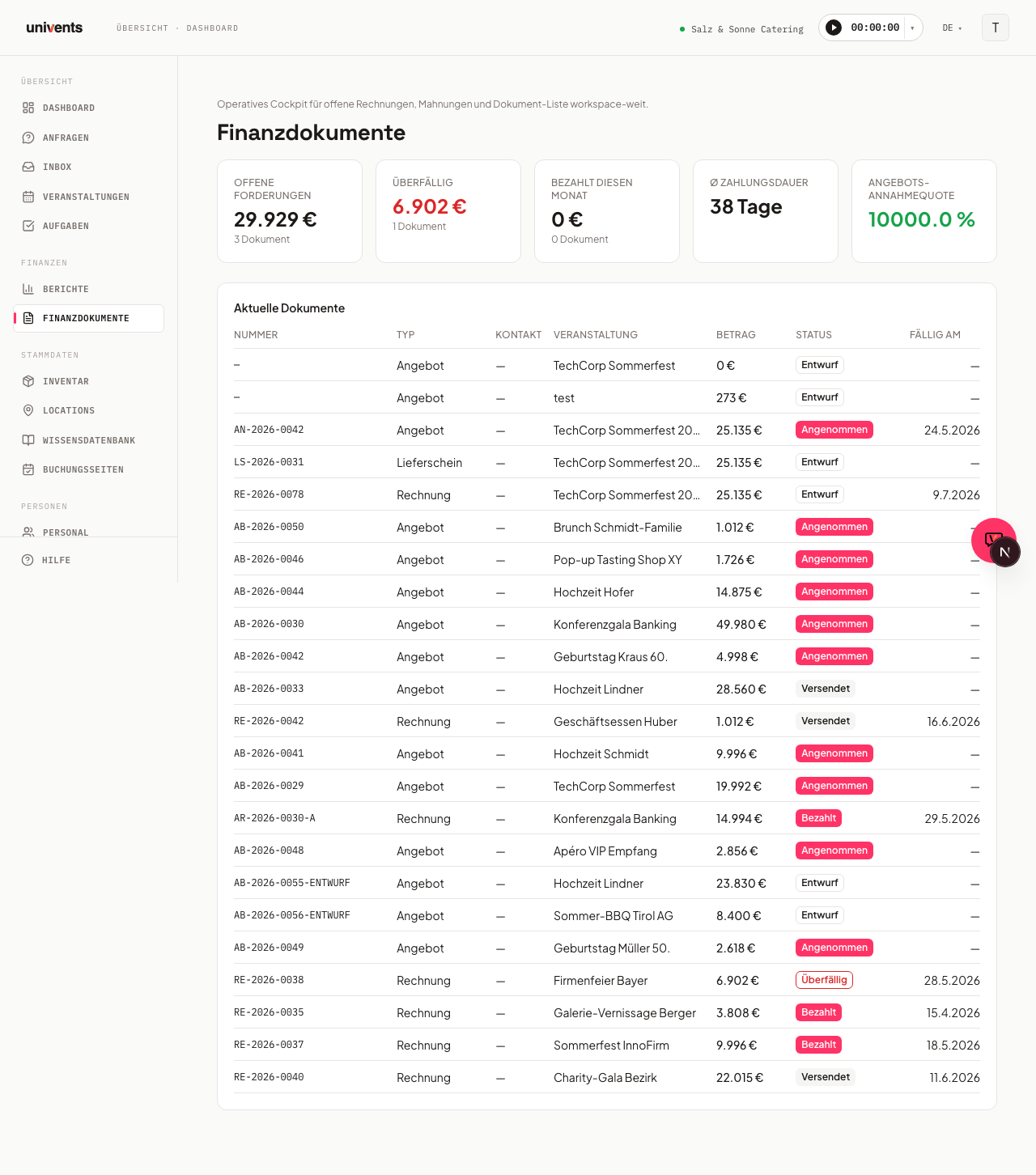
The Five KPI Cards
At the top of the page you'll find five metrics calculated automatically from your finance documents.
Outstanding shows the total amount of all sent, unpaid invoices along with the document count below it. If the amount is zero, the card appears green.
Overdue shows how much of that total has already passed its due date. The figure turns red as soon as at least one document is overdue — a direct signal that action is needed.
Paid this month shows payments received in the current calendar month in euros. A green colour means money has actually come in.
Avg. days to payment shows the average number of days between the invoice date and payment receipt. If no completed payment runs exist yet, a dash is displayed.
Quote acceptance rate shows what proportion of your sent quotes were accepted. At 70 % or above the rate appears green, below that red — so you can see at a glance whether your quotes are landing.
The Document List
Below the KPI cards sits the Recent Documents table. It lists the most recent 50 finance documents across your entire workspace with the following columns:
- Number — sequential document number
- Type — quote, invoice, delivery note, or credit note
- Contact — linked customer
- Event — associated event
- Amount — gross total amount
- Status — current document status
- Seen — shows whether the customer has already opened the document in the EventHub customer portal
- Due date — invoice due date
Clicking a row opens the document's detail view directly within its event.
Understanding the "Seen" Column
As soon as a customer opens a finance document in the EventHub customer portal, Univents logs it automatically. The Seen column shows this signal directly in the document list:
- Green with a "Seen by customer" label — the customer has opened the document at least once in the portal. Hovering over the text shows a tooltip with when the document was first and last opened.
- Grey "Unseen" — no portal view has been recorded for this document yet.
This is especially useful when following up: if an overdue invoice still shows Unseen, it's worth a call or a reminder email before sending a formal dunning notice — the customer may simply not have seen the invoice yet.
Understanding Status Badges
The Status column shows the current state of each document:
| Badge | Meaning |
|---|---|
| Draft | Not yet sent |
| Sent | Sent to the customer |
| Paid | Payment confirmed |
| Overdue | Due date has passed |
| Cancelled | Document has been cancelled |
For quotes, the additional states are: Accepted, Rejected, and Expired.
How to Reach the Cockpit
- Navigate to Finance Documents in the left sidebar.
- The cockpit opens immediately — KPI cards at the top, document list below.
The link /berichte/cockpit redirects automatically to the same page, so any existing bookmarks will continue to work.
Frequently Asked Questions
Why does "Avg. days to payment" show a dash? There are no completed payment runs yet. As soon as at least one invoice has been marked as Paid, an average value in days will appear here.
Why is "Overdue" red even though I already sent the invoice? The invoice's due date has already passed. Open the document via the table and mark it as paid, or adjust the due date.
Can I see all documents in my workspace here? Yes. The cockpit shows the most recent 50 documents across your entire workspace, regardless of which event they are assigned to. Older documents can be accessed directly through their respective event.
How does Univents know whether the customer has seen a document? Univents logs it automatically as soon as the customer opens a document in the EventHub customer portal. The Seen column reflects exactly that signal.
What is the difference between this and the "Outstanding invoices" report under Reports? Under Reports > Outstanding invoices you will find a static snapshot of AR metrics without a document list. The cockpit under Finance Documents is its operational counterpart: from here you can jump directly into individual documents and take action.