

Top Customers by Revenue
After reading this, you'll know how to see your highest-revenue customers for any selected period at a glance and how to adjust the date range to suit your needs.
The Top Customers report shows you which customers generated the highest gross revenue in the selected period. The calculation is based on issued invoices minus credit notes — summed per contact and sorted in descending order.
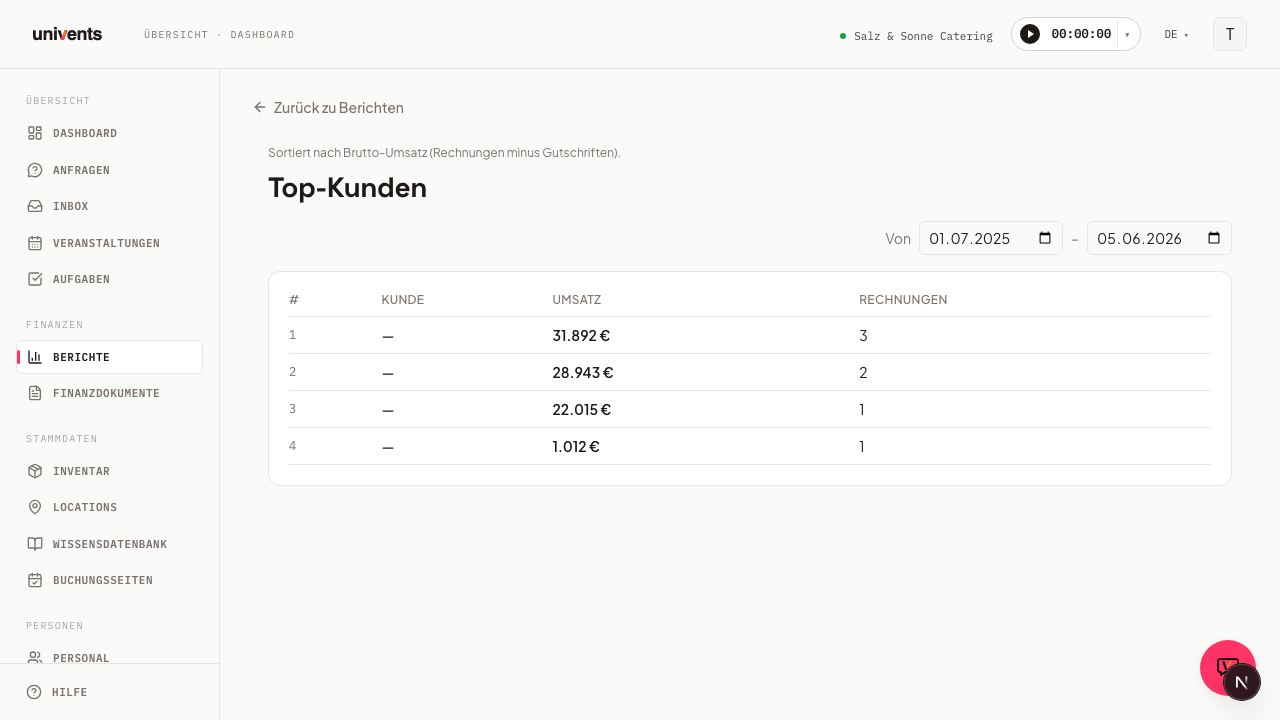
Opening the report
This report is now part of Financial breakdown — there is no separate tile for it in the Reports hub anymore. If you open an old link to this page, Univents automatically redirects you to the right view.
- Navigate to Reports in the left menu.
- Click the Financial breakdown card.
- In the Group by bar, select the Customer view.
- The page loads automatically with a default period of the last twelve months.
Reading the table
The table contains four columns:
| Column | Contents |
|---|---|
| # | Rank (1 = highest revenue) |
| Customer | Contact name |
| Revenue | Gross revenue (invoices minus credit notes) |
| Invoices | Number of documents in the period |
Up to 20 customers are displayed. Contacts with no associated invoices or credit notes do not appear.
Adjusting the date range
The date filter is located in the top-right corner above the table.
- Enter the desired start date in the From field.
- Enter the desired end date in the To field.
- The page updates immediately with the new values.
The filter only affects this report — other reports remain unchanged.
Returning to the reports overview
Click Back to Reports in the top-left corner to return to the overview of all reports.
Frequently asked questions
Why is a customer missing even though I issued them many invoices? Check whether the invoices fall within the selected period. In addition, documents must be linked to a contact — invoices without a contact assignment are not included in the calculation.
Is gross or net revenue displayed? The report shows gross revenue (incl. VAT) from invoices and credit notes. Quotes and delivery notes are not included.
What happens if a customer has received a credit note? Credit notes are deducted from the customer's revenue. The displayed amount is therefore the net effect of invoices minus credit notes.
Can I export the table? Yes. Above the table, on the top right, you'll find the Excel export button — it downloads the Top Customers list for the selected date range as an Excel file.